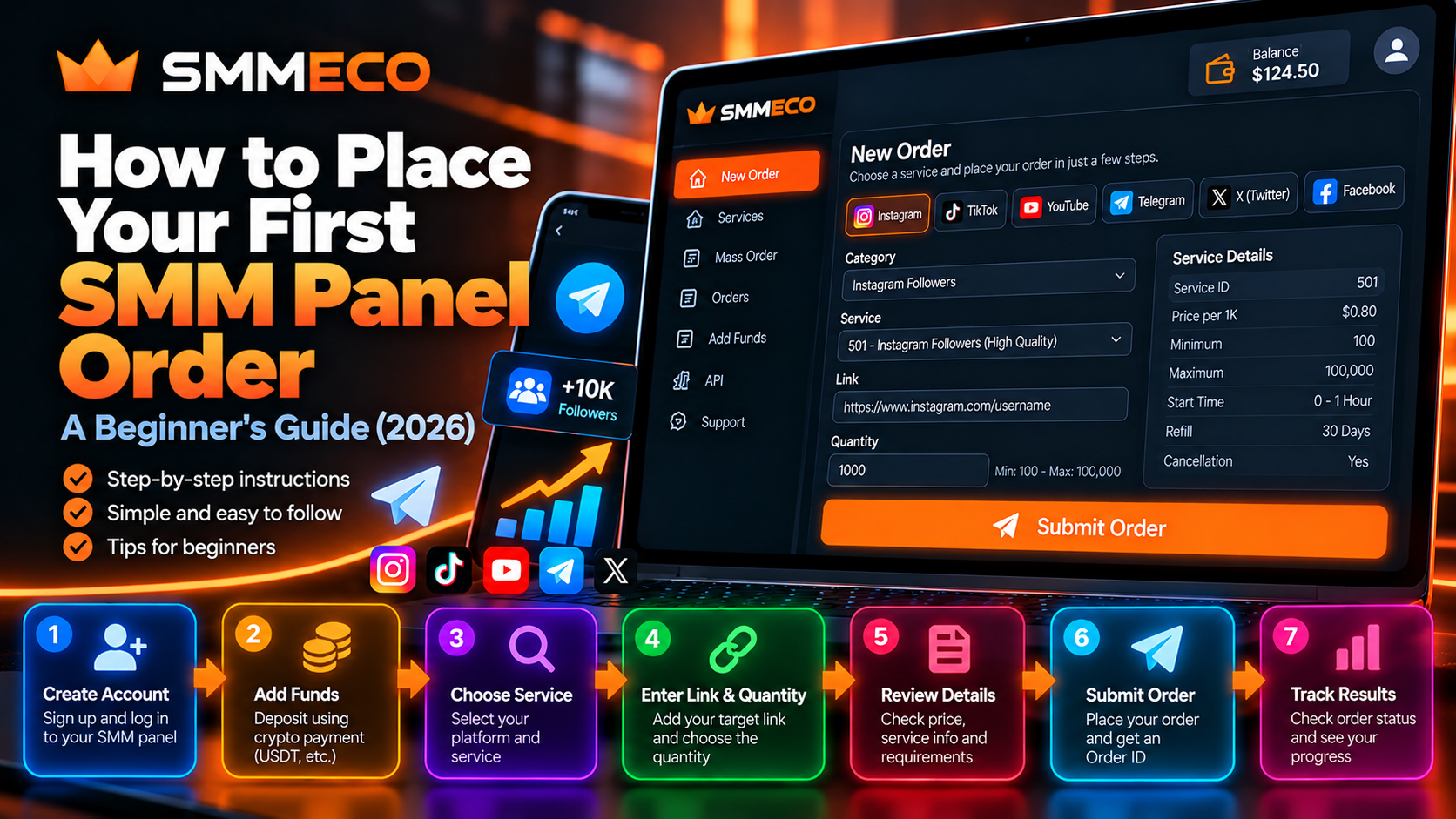
How to Place Your First SMM Panel Order in 2026: A Beginner's Guide
Using an SMM panel for the first time can feel confusing. You create an account, open a service catalog, and suddenly see unfamiliar terms such as Service ID, Minimum Quantity, Refill, Start Time, and Order Status.
You may also wonder how to add funds, where to enter a social media link, or how to check whether an order has been accepted.
Fortunately, understanding the basic ordering workflow doesn't require technical experience.
To place your first SMM panel order, you generally need to create an account, review the available services, check the payment and service conditions, select an eligible service, enter the required information, and confirm the order.
After submission, you can use the assigned Order ID to monitor its processing status.
This beginner-friendly guide explains each stage, the terminology you'll encounter, and the common mistakes worth avoiding.
We'll use SMMECO, a global SMM panel offering Instagram, TikTok, YouTube, and Telegram service categories, as a reference for explaining the general process.
What Is an SMM Panel and How Does It Work?
An SMM panel is an online platform where customers can access and manage third-party social media marketing service orders through a centralized dashboard.
Depending on the provider, the catalog may contain services associated with social media followers, likes, views, and other engagement-related categories.
An SMM panel typically provides several basic functions:
- A user account and dashboard.
- A catalog of available services.
- Service descriptions and ordering requirements.
- Account funding and balance information.
- An order submission interface.
- Order history and status tracking.
- Customer support for account and order-related issues.
Some platforms also provide reseller tools, mass ordering, and API integrations.
However, not all SMM panels offer the same features or conditions.
Importantly, third-party engagement services can carry risks, including violations of the policies of the underlying social media platform. Customers should understand what a service actually provides before making a purchase.
How to Place Your First SMM Panel Order: Quick Overview
The basic process can be summarized in eight steps.
Step 1: Visit the official SMM panel website.
Step 2: Register or sign in to your account.
Step 3: Review the available service categories.
Step 4: Check the selected service's requirements and price.
Step 5: Add funds using an available payment method, if required.
Step 6: Enter the correct target link and permitted quantity.
Step 7: Review the final details and submit the order.
Step 8: Save the Order ID and monitor its status.
The exact screens and options differ between providers, but understanding this sequence will make the process easier.
Let's examine each step.
Step 1: Choose an SMM Panel and Visit Its Official Website
Before creating an account, confirm that you're visiting the provider's official website.
Avoid relying on unfamiliar links sent through unsolicited messages or websites that impersonate established brands.
For example, the official SMMECO website is:
SMMECO describes itself as an affordable SMM panel for resellers, agencies, and individual users.
Its public website identifies Instagram, TikTok, YouTube, and Telegram among its supported service categories.
What Should Beginners Check Before Registering?
Start with basic transparency.
Look for understandable service information, account terms, available support options, and payment conditions.
Check whether the website uses HTTPS and whether the domain matches the provider you intended to visit.
Read the terms of service, especially the sections about payments, cancellations, refunds, and service limitations.
For a more detailed evaluation, see our How to Compare SMM Panel Providers guide.
Beginner tip: A polished website or low advertised price does not independently prove service reliability. Evaluate the published information before committing funds.
Step 2: Create Your SMM Panel Account
Most SMM panels require an account to access their ordering and balance management features.
Registration commonly involves providing basic account details and choosing login credentials.
The exact registration requirements depend on the provider.
How to Register Safely
Use accurate account information where required.
Create a unique, strong password that you do not reuse on unrelated websites.
If the platform offers additional account security features, review whether they are appropriate for your account.
Never share your password or verification codes with other users.
You should also verify that you meet the provider's minimum age and eligibility requirements.
SMMECO's published terms require users to be at least 18 years old or the legal age necessary to enter into a binding agreement in their jurisdiction.
What Happens After Registration?
Once your account is available, you can access the platform's permitted account features.
These may include service browsing, balance management, order history, and support.
Do not assume that creating an account automatically adds promotional or test funds.
Any available bonus or promotional credit should be confirmed through the provider's current account information.
Step 3: Understand the SMM Panel Dashboard
An SMM panel dashboard is the central interface used for managing your account and orders.
Although layouts vary, several sections are common across the industry.
New Order
This area is generally used to prepare and submit an individual service request.
You may need to select a service category, choose a Service ID, provide a link, and specify a quantity.
Services
The service catalog contains available listings and their published specifications.
Some panels organize services by platform, category, price, or additional features.
Add Funds
This area allows eligible users to fund their account using the provider's supported payment methods.
Orders or Order History
This area typically contains submitted Order IDs, service information, quantities, charges, and current processing statuses.
Support
The support section provides a way to report account problems, payment discrepancies, or order issues.
API and Mass Order
Some SMM panels offer additional tools for developers, resellers, and customers handling multiple requests.
These features are generally not necessary for understanding a basic first order.
Important: These are common interface concepts, not a claim that every SMMECO account currently displays identical menu labels or screen layouts.
Step 4: Select the Right SMM Panel Service
Choosing a service is one of the most important parts of the ordering process.
An SMM panel can contain several listings with similar names but different requirements.
For example, services associated with Instagram profiles may have different specifications from services associated with individual posts or videos.
Likewise, Telegram channel services may have different requirements from Telegram group services.
Understand Service Categories
Start by choosing the appropriate social media platform.
Then examine the specific service listing.
Read its description rather than selecting a service based solely on its title.
Pay attention to the following details:
Service ID: The identifier associated with the listing.
Service Name: The description of what the listing offers.
Price: The advertised rate or charge.
Minimum Quantity: The smallest accepted request.
Maximum Quantity: The largest accepted request.
Start Time: Where provided, an estimate of when processing may begin.
Refill: Whether an eligible replacement or refill option is offered.
Cancellation: Whether cancellation requests are supported under certain conditions.
What Is a Service ID?
A Service ID identifies a specific service within the provider's catalog.
For example, consider two fictional services:
Service ID 101 — Example Service A
Service ID 205 — Example Service B
These numbers are illustrative and are not current SMMECO service IDs.
The Service ID helps the ordering system identify which listing has been selected.
It should not be confused with the Order ID generated after submission.
How to Avoid Choosing the Wrong Service
Before selecting a listing, verify the target type, quantity requirements, current price, and service limitations.
If the description is unclear, ask for clarification before purchasing.
A lower price does not automatically mean the service is suitable for your requirements.
For more on evaluating service prices, read our Cheap SMM Panel Guide.
Step 5: Understand SMM Panel Pricing Before Adding Funds
SMM panels often display quantity-based service prices using a rate per 1,000 units.
However, not all service categories use exactly the same pricing structure.
How Is SMM Panel Order Cost Calculated?
For services priced per 1,000 units, a common formula is:
Estimated Order Cost = (Requested Quantity ÷ 1,000) × Rate per 1,000
Let's consider a hypothetical service.
Rate per 1,000: $0.80
Requested quantity: 500
Estimated cost:
(500 ÷ 1,000) × $0.80 = $0.40
If the quantity increases to 2,000, the estimated base cost becomes:
(2,000 ÷ 1,000) × $0.80 = $1.60
These are mathematical examples, not live SMMECO rates.
Actual prices depend on the selected service and applicable billing conditions.
Is the Price per 1,000 the Same as the Minimum Deposit?
No.
A service price describes the cost of a particular service quantity.
The minimum deposit, where applicable, describes how much money must be added to the account through an available payment method.
These are separate concepts.
A service might have a small estimated base cost while the provider's payment system has a higher funding minimum.
Always review the current funding rules before depositing.
Step 6: Add Funds to Your SMM Panel Account
Many SMM panels use prepaid account balances.
In this model, customers add funds and then use the available balance for eligible service purchases.
The supported payment methods vary between providers.
How Does SMMECO Account Funding Work?
SMMECO publicly describes cryptocurrency-based account funding.
Its available payment options and instructions are presented through the platform.
The exact cryptocurrency, blockchain network, minimum deposit, and payment instructions should be checked directly before transferring funds.
Important Checks Before a Cryptocurrency Deposit
Verify the currency.
Confirm that you are sending the exact cryptocurrency accepted for the selected payment method.
Verify the blockchain network.
A cryptocurrency can sometimes exist on multiple networks.
Sending funds through an unsupported network can result in a failed or unrecoverable transfer.
Check the destination address.
Copy the deposit address from the legitimate payment interface and verify it before confirming the transfer.
Review fees and minimums.
Network fees, payment provider charges, or minimum deposit requirements may apply.
Keep the transaction record.
If a deposit is not credited, a transaction identifier may help support investigate the issue.
Does a Deposit Appear Immediately?
Not necessarily.
Cryptocurrency payment processing may depend on network confirmations and provider verification.
A confirmed blockchain transaction also does not automatically mean the internal account balance has already been updated.
If a deposit is missing, check the provider's payment instructions and contact support using the relevant transaction details.
Can You Withdraw Unused SMM Panel Balance?
That depends on the provider's terms and applicable law.
SMMECO's published terms describe account balance as a way to purchase eligible platform services rather than a standard cash-withdrawal account.
Mandatory legal refund and consumer rights remain applicable.
Read the SMMECO Terms of Service before adding funds.
Beginner tip: Avoid depositing more than necessary for your planned, permitted purchases until you understand the account's funding and balance conditions.
Step 7: Enter the Correct Target Link
Once you have chosen a suitable service and reviewed the payment conditions, the next step is to provide the required target information.
In many SMM panels, this involves a URL or username.
The accepted format depends on the selected service.
Profile Links vs Post Links
A profile URL identifies an account.
A post URL identifies a specific piece of content.
These are not interchangeable.
For example, a service requiring an individual post should not be assumed to accept an entire profile URL.
Why Do SMM Orders Fail Because of Links?
Common problems include:
- Missing parts of the URL.
- Incorrect usernames.
- Deleted or inaccessible content.
- Private targets when public access is required.
- Unsupported link formats.
- Changes to the target while an order is processing.
How to Check a Link Before Submission
Open the original URL in your browser.
Confirm that it points to the correct destination.
Then compare the URL type with the service's published requirements.
Avoid entering another person's private or restricted information without appropriate authorization.
Important: Do not provide social media account passwords or two-factor authentication codes for ordinary service ordering.
Step 8: Enter the Order Quantity
After choosing the service and entering the target, you'll generally need to specify the requested quantity.
The accepted range depends on the service.
Consider the following fictional example:
- Minimum quantity: 100
- Maximum quantity: 10,000
- Selected quantity: 500
A quantity of 500 falls within this example's allowed range.
However, different listings can have different rules.
What Happens If You Enter Too Little?
The ordering interface may reject a request below the service's minimum quantity.
What Happens If You Exceed the Maximum?
A request above the maximum may also be rejected.
Do not assume that every service supports the same upper limit.
Does a Larger Quantity Guarantee Better Results?
No.
A larger quantity does not guarantee authentic audience growth, additional sales, improved organic visibility, or long-term retention.
In some cases, artificial engagement can violate platform rules or misrepresent audience activity.
Choose services based on their actual terms, legitimacy, and suitability rather than assuming that bigger numbers automatically provide better value.
Step 9: Review Your Order Before Submitting
Before confirming the order, carefully review the information entered.
A short verification process can prevent expensive mistakes.
First-Order Verification Checklist
- The correct service has been selected.
- The Service ID matches the intended listing.
- The submitted target is correct and accessible.
- The quantity meets the service requirements.
- The estimated cost is understood.
- The account balance is sufficient.
- The service's refill and cancellation conditions have been reviewed.
- The activity complies with applicable rules.
- No unresolved duplicate order exists for the same target.
When the information is correct and the order is permitted, you can submit it through the platform's ordering interface.
What Happens After Clicking Submit?
A successfully accepted order generally receives an Order ID.
The order may then appear in the account's order history.
However, clicking Submit does not independently guarantee acceptance or fulfillment.
If the interface displays an error or the page stops responding, verify whether the order was accepted before trying again.
Repeated submissions can create duplicate orders and additional charges.
Step 10: Save Your Order ID and Track the Order
The Order ID is the reference used to identify a particular order.
It is different from the Service ID.
For example:
Service ID: 205
Identifies the selected service listing.
Order ID: 85021
Identifies one submitted order.
Both numbers are hypothetical.
A customer could place several separate orders using the same Service ID, and each accepted order would normally receive its own Order ID.
Why Should You Save the Order ID?
It can help you:
- Find the correct order in your history.
- Check the current processing status.
- Report a delay.
- Request support.
- Review a partial or canceled order.
- Reconcile a charge or balance adjustment.
For customers managing multiple requests, keeping a simple order record can be especially useful.
Understanding Your First SMM Panel Order Status
After submission, an order may display several possible statuses.
Pending
The system has recorded the order, and it is awaiting processing.
A Pending status does not automatically mean something is wrong.
Processing or In Progress
The order is being handled according to the provider's workflow.
This does not guarantee immediate visible results.
Completed
The system reports that the fulfillment process has finished.
Completed does not necessarily mean permanent engagement or guaranteed business performance.
Partial
The system reports that only part of the requested quantity was fulfilled.
Review the final charge and any account balance adjustment.
Canceled
The order has been stopped or closed under the applicable conditions.
A canceled status should be evaluated alongside the actual financial and fulfillment records.
Important: Order statuses describe what the provider reports. They are not independent proof that the delivered engagement is genuine or that the activity complies with the social media platform's policies.
Common Mistakes Beginners Make With SMM Panels
Many first-time ordering problems come from misunderstandings rather than complicated technical failures.
Mistake 1: Choosing the Cheapest Service Without Reading Its Description
The advertised rate may look attractive, but the listing could have restrictions that do not match your requirements.
Better approach: Compare the service specifications and policies before evaluating price.
Mistake 2: Entering the Wrong Link
A profile link submitted to a service requiring a specific post can cause problems.
Better approach: Verify the exact URL format before confirmation.
Mistake 3: Confusing Service ID With Order ID
These identifiers serve different functions.
Better approach: Use the Service ID to identify a catalog listing and the Order ID to identify a submitted request.
Mistake 4: Ignoring Quantity Limits
An invalid quantity may cause the order to be rejected.
Better approach: Check the minimum and maximum quantities shown for the selected service.
Mistake 5: Depositing Funds Without Reviewing Payment Terms
A customer may overlook minimum deposits, fees, supported networks, or account balance restrictions.
Better approach: Review all payment instructions and current terms before transferring money.
Mistake 6: Placing Duplicate Orders After a Delay
A Pending order may still be processed.
Submitting another request for the same service and target can create overlapping orders.
Better approach: Check the original Order ID and contact support when necessary.
Mistake 7: Assuming Every Service Includes Refill Protection
Some services include limited refill eligibility, while others explicitly offer no refill guarantee.
Better approach: Check the individual listing and the applicable conditions.
Read our SMM Panel Refill, Cancel & Drop Policies Guide for a more detailed explanation.
Mistake 8: Treating Completed as Guaranteed Permanent Results
A completed record describes the provider's order status.
It does not guarantee genuine audience interest or permanent retention.
Better approach: Evaluate results and service terms separately from the dashboard label.
What Should You Do If Your First SMM Panel Order Is Not Starting?
If your order does not appear to be progressing, begin with the information you can verify.
First, confirm that an Order ID was assigned.
Then review the submission time and the service's published start estimate.
Check whether the original target is still accessible and whether the service conditions have changed.
If the order remains delayed beyond the applicable timeframe, contact support with the relevant Order ID.
Avoid submitting another paid request until you understand what happened to the original.
What Should You Include in a Support Message?
A useful support request might contain:
Order ID: 85021
Service ID: 205
Current Status: Pending
Issue: The order remains Pending beyond the advertised start estimate.
Request: Please review the current processing state and advise whether additional information is needed.
These identifiers are fictional examples.
Keep your message concise and factual, and never include passwords or private API keys.
Single Orders vs Mass Orders: What Should Beginners Choose?
Most first-time users only need to understand the normal individual ordering workflow.
A single order involves selecting one service, entering the required target information, specifying a quantity, and submitting the request.
Mass Order functionality is designed for submitting multiple individual requests together.
SMMECO publicly advertises Mass Order as an available feature.
However, batch ordering introduces additional requirements, such as organizing multiple service IDs, links, and quantities.
For someone still learning the platform, understanding a single order first makes the overall process easier to follow.
Do Beginners Need an SMM Panel API?
No.
An API is generally used by software applications that need to communicate with a provider.
It can support functions such as service retrieval, automated order submission, and status checks.
For ordinary manual ordering, users typically do not need to write code or configure API credentials.
SMMECO publishes API documentation for compatible applications.
However, API integration is a separate technical workflow from placing an individual order through the dashboard.
How to Evaluate an SMM Panel After Your First Order
A first order can provide information about the provider's workflow, but it cannot establish long-term reliability.
If a permitted order has been accepted and processed, review the following:
Order Records: Was the accepted request recorded accurately?
Pricing: Did the final charge match the applicable terms?
Status Information: Were the status labels understandable?
Support: Was there a clear way to request assistance if needed?
Account Balance: Were any adjustments recorded correctly?
Service Conditions: Did the provider handle the request according to its published rules?
These questions can help you evaluate administrative transparency.
They do not establish that artificial engagement is permitted, authentic, or effective.
Are SMM Panels Safe for Beginners?
Safety depends on the provider, selected service, payment arrangements, and applicable social media platform rules.
Not every service in a third-party SMM catalog is necessarily permitted by the underlying platform.
For example, YouTube's Fake Engagement Policy prohibits artificial inflation of views, likes, and other engagement metrics.
Other platforms also maintain rules concerning spam, deceptive activity, and inauthentic engagement.
Can an SMM Panel Guarantee Account Safety?
No responsible provider should guarantee that every third-party service is completely risk-free.
Possible consequences of prohibited engagement practices include removed activity, account restrictions, or other platform enforcement.
Does Buying Engagement Guarantee More Sales?
No.
Follower counts, views, and likes do not automatically represent genuine customers, authentic community participation, or increased revenue.
For sustainable marketing, businesses should prioritize useful content, legitimate advertising, relevant audiences, and meaningful engagement.
An SMM panel's order-processing features should never be confused with proof of marketing effectiveness.
Frequently Asked Questions About Placing Your First SMM Panel Order
How do I place my first SMM panel order?
Create an account, review the available services, check the service and payment conditions, select an eligible service, provide the required target information, choose a permitted quantity, and confirm the order. Save the assigned Order ID to track its status.
Do I need technical knowledge to use an SMM panel?
Generally, no. Manual ordering interfaces are designed to let users prepare requests without programming. API integration and automated reseller tools are separate technical features.
What is the minimum order quantity in an SMM panel?
The minimum quantity depends on the selected service. Different listings may have different limits, so check the current service specifications before ordering.
Can I use an SMM panel without adding funds?
You may be able to register and browse certain account features without funding your balance. Paid services generally require sufficient available funds or another supported payment arrangement.
How much does my first SMM panel order cost?
The cost depends on the selected service, quantity, rate, and applicable charges. For services priced per 1,000 units, a common estimate is Quantity divided by 1,000, multiplied by the listed rate.
What is a Service ID?
A Service ID identifies a particular service within the provider's catalog. It should not be confused with the Order ID assigned to a submitted order.
What is an Order ID used for?
An Order ID identifies a specific accepted order. It is commonly used for tracking, support, and reviewing the order's status or charge.
How long does an SMM panel order take to start?
Start times vary by service and provider. A displayed estimate should not automatically be interpreted as a guaranteed start or completion time.
Why is my first order still Pending?
Pending commonly means that the system has recorded the order and is waiting for processing. Check the service's estimated start period and the original target before requesting support.
Can I cancel my first SMM panel order?
That depends on the selected service, its processing stage, and the applicable cancellation conditions. Not every submitted order can be canceled.
Can I get a refund if an order fails?
Available remedies depend on the provider's terms, the actual order outcome, and applicable law. Some adjustments may be credited to the internal account balance, while mandatory consumer refund rights remain applicable.
Does SMMECO accept cryptocurrency payments?
SMMECO publicly advertises cryptocurrency-based account funding. Check the current payment interface for supported currencies, networks, fees, and minimum amounts before transferring funds.
Does SMMECO offer an API?
Yes. SMMECO publishes API documentation covering service retrieval, order submission, order-status checks, account balance information, and certain other operations.
Can I submit several orders at once?
Some providers offer Mass Order functionality. SMMECO advertises this feature, but users should confirm the current accepted input format and service eligibility before using it.
Is the cheapest SMM panel always the best for beginners?
No. Price should be considered alongside service specifications, payment terms, customer support, refund conditions, platform rules, and account security.
Final Thoughts: Getting Started With Your First SMM Panel Order
Understanding how to use an SMM panel begins with understanding its basic ordering workflow.
Before placing your first order, learn how service categories, Service IDs, quantity limits, account balances, and Order IDs work.
Pay particular attention to the target link and applicable service conditions.
A small data-entry mistake can cause an order to fail or become difficult to investigate.
Payment terms also deserve careful review, especially when deposits involve cryptocurrency networks and prepaid account balances.
Once an order has been accepted, its Order ID provides the main reference for tracking and support.
Most importantly, remember that order completion and genuine marketing value are different concepts.
SMMECO offers a global SMM panel interface with social media service categories, account funding, order management, and additional tools for resellers and agencies.
To explore its currently available features and service conditions, visit SMMECO.com.
Key takeaway: Your first SMM panel order should begin with understanding the service, its requirements, its risks, and its final cost—not simply clicking the cheapest option.