SMM Panel API for Resellers: Complete Integration Guide 2026
Managing hundreds of customer orders manually can become a challenge for an SMM reseller business.
As order volumes increase, resellers often need better tools for importing services, managing supplier prices, tracking orders and organizing customer requests.
This is where an SMM panel API becomes useful.
An API allows compatible software systems to exchange information and automate supported operations without requiring every task to be completed manually.
For SMM resellers, API integration can connect a customer-facing panel with an upstream service provider.
In this guide, you'll learn how SMM panel APIs work, how to connect a provider, which API operations are commonly supported, and how to avoid technical mistakes when building an automated reseller workflow.
What Is an SMM Panel API?
An SMM panel API (Application Programming Interface) is a software interface that allows external applications to communicate with an SMM panel.
Instead of manually accessing a supplier's dashboard for every task, a reseller can use an API to perform supported operations through software.
Depending on the provider, an SMM API may allow users to:
- Retrieve available SMM services.
- Check current service prices.
- Submit new orders.
- Track order statuses.
- Check account balances.
- Request eligible refills.
- Submit supported cancellation requests.
- Connect multiple business systems.
Quick Answer: An SMM panel API allows reseller platforms to communicate with upstream providers and automate supported service catalog, order management and account operations. Available features depend on the provider's API documentation.
For businesses managing multiple customer orders, this can reduce repetitive administrative work.
However, API integration does not automatically guarantee faster service delivery or better service quality.
How Does SMM Panel API Integration Work?
An SMM reseller typically operates a website where customers browse services and submit orders.
The reseller may source those services from another provider.
API integration connects the reseller's internal order system with the supplier.
A simplified workflow looks like this:
Customer → Reseller Website → API Integration → SMM Provider
Once an order has been submitted, the reseller can use the provider's API to retrieve its latest status.
The reseller's system can then update its internal order record.
Example of an Automated Order Workflow
Consider a customer who submits an order through a reseller website.
Step 1: The customer selects an available service and enters the required order details.
Step 2: The reseller system validates the information and creates an internal order record.
Step 3: The integration checks the relevant service ID and prepares a provider API request.
Step 4: The provider receives the request and returns a response.
Step 5: If the request succeeds, the reseller stores the supplier's external order ID.
Step 6: The reseller periodically checks the external order status.
Step 7: The customer-facing dashboard displays the latest available information.
This workflow can reduce manual data entry while helping resellers organize orders across systems.
Common SMM Panel API Functions
Many SMM panel providers use API structures with similar operations.
One widely used pattern is an API v2-style interface that accepts HTTP POST requests and returns JSON responses.
However, this is an industry convention rather than a universal specification implemented identically by every provider.
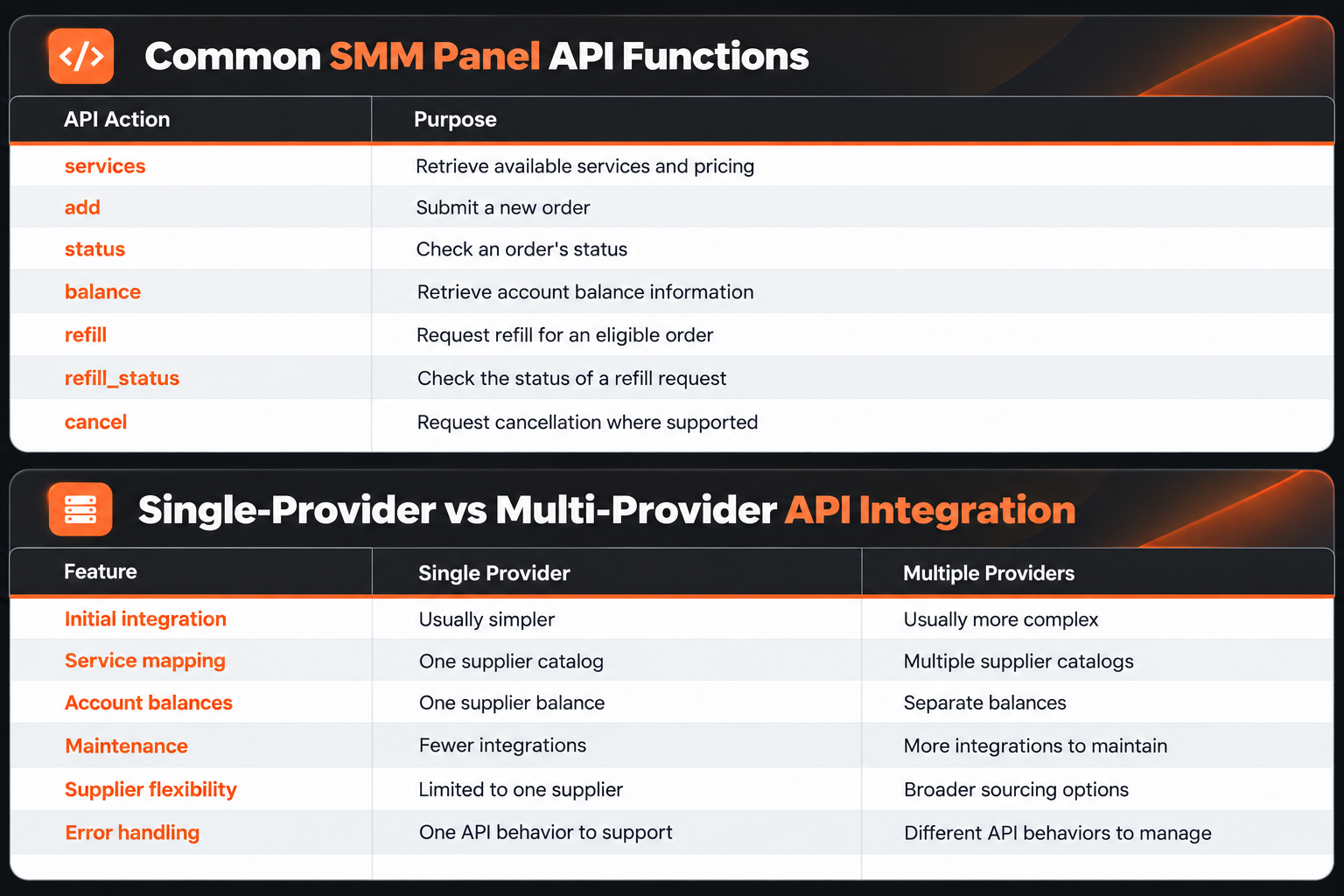
The following table summarizes common API functions.
Some providers support additional actions or use entirely different endpoint structures.
Always consult the actual supplier's documentation before developing an integration.
How to Integrate an SMM Panel API: Step-by-Step
Step 1: Choose an API-Compatible SMM Provider
Start by selecting a provider that supports the operations required by your business.
Not every SMM panel offers the same integration capabilities.
Check whether the provider supports service retrieval, order submission, status tracking and balance management.
For reseller businesses, clear documentation and predictable error responses are particularly important.
Before selecting a supplier, review its service terms, payment requirements, security practices and applicable platform policies.
Step 2: Obtain Your API Credentials
Most providers require some form of authentication before accepting API requests.
A common approach uses a private API key associated with the reseller's account.
This key identifies the requesting account and may authorize paid operations.
Important: Never share your API key publicly or include it in browser-side JavaScript.
Store API credentials securely on your server.
If a key becomes compromised, revoke or regenerate it using the controls supported by the provider.
Step 3: Configure the Provider API Endpoint
Each supplier defines an API endpoint where integration requests must be sent.
In many API v2-style systems, the endpoint follows a pattern similar to:
https://provider.example/api/v2
This address is only an illustrative example, not a working provider endpoint.
Use the exact URL provided in your supplier's API documentation.
Some providers support form-encoded POST requests, while others may require different request formats.
Your integration should follow the documented authentication, request and response requirements.
Step 4: Retrieve the Service Catalog
The service catalog is one of the most important parts of an SMM API integration.
In common API v2 implementations, a service-list request uses the action:
action=services
The provider may return details such as:
- Service ID
- Service name
- Category
- Service type
- Rate
- Minimum quantity
- Maximum quantity
- Refill availability
- Cancellation availability
For example, a reseller may use the returned service IDs to connect supplier products with its own catalog.
Do not assume that a supplier's service ID will always remain unchanged.
Maintain a local service mapping and review updates before automatically modifying customer-facing listings.
Step 5: Submit Orders Through the API
After integrating the service catalog, the reseller can implement supported order-submission functions.
A common API v2-style order request uses these parameters:
ParameterDescriptionkeyPrivate API credentialactionRequested API operation, such as addserviceSupplier's service IDlinkTarget URL or identifierquantityRequested order quantity
Some services require additional parameters.
For example, services supporting scheduled delivery may require interval or repeat settings.
The integration should validate all required information before sending a paid order request.
It should also verify service availability and quantity restrictions.
Step 6: Save the External Order ID
After a successful submission, the provider may return an order identifier.
The reseller should store that identifier alongside its own internal order number.
For example:
- Internal order ID: 12501
- External provider order ID: 894321
- Provider reference: Supplier A
- Service ID: 320
- Current status: Pending
These values are illustrative.
Keeping internal and external order identifiers separate helps prevent confusion when processing support requests or using multiple suppliers.
It also allows the reseller to identify which supplier is responsible for a particular external order.
Step 7: Automate Order Status Tracking
After an order has been submitted, the reseller needs a process for checking its status.
In many API implementations, a status request uses:
action=status
Some APIs allow multiple order IDs to be checked in a single request.
This is commonly called bulk status checking.
Possible order statuses include:
- Pending
- In progress
- Processing
- Completed
- Partial
- Canceled
Status names, formats and available fields vary by provider.
For example, a Partial status may indicate that only part of the requested quantity was delivered, with an associated adjustment.
Your application should follow the supplier's documented behavior instead of assuming every provider handles partial orders identically.
Why SMM API Integration Matters for Resellers
Reduced Manual Work
A reseller processing a large number of orders may spend significant time entering order details and checking statuses.
API integration can automate supported administrative tasks.
This allows businesses to organize repetitive work more efficiently.
Centralized Service Management
Resellers may import available service information from an upstream provider.
A centralized catalog can simplify price updates and service mapping.
However, imported descriptions should still be reviewed before publication.
Order Tracking
Automated status retrieval helps keep internal order records synchronized with provider information.
This can reduce the need for repeated manual status checks.
Multi-Provider Integration
Some reseller platforms support connections to multiple providers.
This can allow a business to manage different supplier catalogs through a single internal system.
However, each integration introduces additional technical responsibilities.
Better Operational Reporting
By storing accurate order data, resellers can analyze supplier costs, order volumes, error rates and other operational metrics.
These insights can support decisions about pricing, support resources and supplier selection.
Single-Provider vs Multi-Provider API Integration
There are two common approaches to building an SMM reseller integration.
Single-Provider API Setup
A single-provider configuration connects the reseller website to one upstream supplier.
Potential advantages include simpler service mapping, fewer API credentials and easier maintenance.
The main limitation is dependence on one supplier.
Multi-Provider API Setup
A multi-provider configuration connects one reseller system to several suppliers.
This can provide greater flexibility when different providers offer different service categories.
However, multi-provider systems require more careful handling of service IDs, account balances, API formats and order statuses.
Comparison
Neither approach is automatically better.
A new reseller may benefit from a simpler integration, while a larger operation may require additional supplier connections.
Common SMM Panel API Integration Errors
Technical issues are unavoidable in systems that depend on external services.
A well-designed integration should handle errors without creating unnecessary duplicate orders or incorrect customer balances.
Invalid API Key
An authentication error may indicate an incorrect, expired or revoked API credential.
Verify the configured key using the provider's documented procedure.
Never expose the full key in a support screenshot or public error log.
Invalid Service ID
A service ID may be incorrect, unavailable or no longer supported.
Refresh the service catalog and confirm the current supplier mapping.
Avoid silently replacing unavailable services with unrelated products.
Insufficient Provider Balance
Some supplier APIs reject paid orders when the account balance is insufficient.
Your system should distinguish these errors from network failures or invalid service data.
Incorrect Order Parameters
The requested quantity may exceed the service's limits, or the submitted link may not match the supported format.
Validate inputs before submission.
Network Timeouts
A timeout does not always mean that the provider rejected an order.
The provider may have processed the request even though the reseller did not receive the response.
Never automatically submit a second paid order simply because the first request timed out.
Check the internal order record, available supplier history or any provider-supported reconciliation mechanism first.
If the outcome remains uncertain, mark the order for investigation instead of risking duplicate submission.
Unexpected API Responses
An API may return an error object, missing data or a temporarily unavailable response.
The reseller's software should validate the response structure before recording the operation as successful.
An HTTP success status alone does not always mean the requested business operation succeeded.
How to Prevent Duplicate SMM Orders
Duplicate orders are an important risk in automated reseller operations.
They can occur when:
- A customer submits the same order twice.
- The application repeats a request after a timeout.
- A background worker processes the same queued task more than once.
- Two workers attempt to submit the same internal order.
A practical prevention strategy includes maintaining a unique internal order reference, tracking submission attempts and ensuring only one worker can submit a given order at a time.
When the supplier supports idempotency keys, use them according to its documentation.
If the provider does not support idempotency, maintain a local submission state and reconcile uncertain requests before retrying.
Avoid placing overlapping orders for the same target when the service conditions prohibit it.
API Rate Limits and Polling Intervals
An SMM reseller may need to retrieve order statuses regularly.
However, repeatedly sending requests can create unnecessary API traffic and may exceed a provider's rate limits.
For example, imagine a reseller managing 2,000 active orders.
Checking each order individually every minute would generate:
2,000 requests × 60 minutes = 120,000 requests per hour
If the provider supports bulk status requests, the reseller may be able to retrieve multiple order statuses per request.
This can greatly reduce the number of API calls.
The optimal schedule depends on supported batch sizes, published rate limits, order volumes and business requirements.
Use reasonable polling intervals, backoff after temporary errors and avoid unnecessary repeated requests.
SMM Panel API Security Best Practices
API credentials can provide access to sensitive account functions.
For reseller businesses, a compromised key may expose operational information or allow unauthorized paid orders.
Useful security practices include:
- Store API keys on the server, not in frontend code.
- Use HTTPS for provider connections.
- Restrict access to sensitive integration settings.
- Avoid including credentials in application logs.
- Rotate exposed API keys.
- Validate all incoming and outgoing data.
- Use authorization checks for customer and staff operations.
- Monitor unexpected API activity.
- Protect background jobs against duplicate execution.
- Keep software dependencies updated.
An upstream API should be treated as an external dependency, not an automatically trusted source.
For additional technical guidance, review the OWASP API Security Project.
How to Compare SMM API Providers
When evaluating a potential supplier, consider more than whether it advertises API support.
An API provider should be assessed according to its documented features and operating conditions.
API Documentation
Does the provider explain the supported actions, required parameters and expected responses?
Authentication
How are credentials generated, secured and revoked?
Service Catalog
Can your software obtain the service data it needs?
Order Tracking
Does the provider support status requests, and are the returned values clearly documented?
Error Handling
Can your integration distinguish authentication failures, invalid requests and temporary connection issues?
Rate Limits
Are the permitted request rates and bulk operations documented?
Payment Terms
How are orders charged to the provider balance, and how are refunds or partial orders represented?
Support Procedures
Is there a clear process for investigating API-related order problems?
These details are more useful than choosing an API provider based on price alone.
SMM Panel API and Reseller Profit Margins
Automation can reduce repetitive work, but it does not eliminate business expenses.
For reseller businesses, profitability depends on several factors:
- Supplier service costs
- Customer selling prices
- Payment transaction fees
- Technical hosting expenses
- Software maintenance
- Support workload
- Refund and adjustment costs
Consider a hypothetical example.
A reseller charges a customer $5.00 for a service.
The supplier charges $3.00, while combined payment and allocated operating expenses are $0.75.
The contribution is:
$5.00 − $3.00 − $0.75 = $1.25
The illustrative contribution margin is:
$1.25 ÷ $5.00 × 100 = 25%
These figures are examples, not verified market prices.
An API integration may help reduce manual administrative work, but profitability still depends on actual expenses and customer demand.
Does Every Main Provider SMM Panel Offer an API?
No.
The terms main provider SMM panel and SMM panel API provider describe different characteristics.
A main provider is commonly understood to be an upstream service supplier.
An API provider is a platform that makes certain functions accessible through a software interface.
A business can act as both.
However, providing API access does not prove that a company owns the underlying service infrastructure.
Likewise, a direct service supplier may operate without offering a public API.
Always distinguish the supplier's role from the features of its software platform.
Common Mistakes When Automating an SMM Reseller Panel
Assuming Every API Uses the Same Format
Many providers follow similar conventions, but their authentication requirements, supported actions and response structures may differ.
Exposing API Credentials
Publishing private API keys in JavaScript, browser requests or public repositories can compromise the provider account.
Ignoring Service Catalog Changes
Outdated service mappings may lead to incorrect orders or failed submissions.
Retrying Orders Without Verification
Automatically repeating uncertain paid requests can create duplicate orders.
Polling Too Frequently
Excessive status requests may waste resources or violate the supplier's request limits.
Ignoring Provider Policies
An automated reseller system must still respect the supplier's refill, cancellation and order restrictions.
Overlooking Platform Compliance
Some third-party social media engagement services may violate platform policies.
Automating the purchase or management of such services does not remove those risks.
Explore SMM Services with SMMECO
SMMECO is a global SMM panel platform offering access to social media marketing service categories, including Instagram, TikTok, YouTube and Telegram.
For reseller businesses, selecting a suitable platform involves evaluating the available service catalog, pricing, order management and technical requirements.
If API integration is part of your business strategy, verify the currently available API features and documentation before connecting your software.
You can explore SMMECO and its available services.
Frequently Asked Questions
What is an SMM panel API?
An SMM panel API is an interface that allows external software to communicate with an SMM panel and perform supported operations such as retrieving services, submitting orders and checking statuses.
How do I integrate an SMM API into my reseller panel?
Choose a compatible provider, obtain the required credentials, configure the documented endpoint, import the service catalog and implement supported order and status operations. Test error handling before relying on the integration.
Is SMM panel API integration free?
Some providers do not charge a separate API access fee, but paid orders and other costs may still apply. Pricing and account requirements depend on the supplier.
Can I connect multiple SMM API providers?
Some reseller platforms support multiple provider connections. Each supplier may require different credentials, service mappings, balances and error-handling procedures.
What is the difference between an SMM API provider and an SMM reseller?
An API provider offers a software interface for supported operations. A reseller commonly sources services from another supplier and sells them through its own platform. One business can perform both roles.
Can an SMM API automatically check order statuses?
Yes, when the provider supports status retrieval. The reseller can request status information and update its internal records according to the returned data.
How can I prevent duplicate orders through an SMM API?
Use unique internal order references, controlled submission workflows, appropriate locking and provider-supported idempotency features. Reconcile uncertain submissions before attempting retries.
Is an API key safe to share with customers?
No. Private supplier API credentials should remain protected on the server. Customers should never receive access to credentials that authorize operations on your supplier account.
Do all SMM panels support refill and cancellation through an API?
No. These features vary between providers and services. Refill and cancellation requests may also depend on specific eligibility rules.
Does using an SMM API guarantee faster service delivery?
No. An API can automate administrative operations, but actual delivery conditions depend on the selected service and supplier.
Final Thoughts
An SMM panel API for resellers can provide useful tools for managing service catalogs, automating supported orders and organizing operational data.
However, successful integration requires more than connecting an endpoint and submitting requests.
Resellers should evaluate supplier documentation, account security, order tracking, error handling, rate limits and service conditions.
As businesses grow, careful API design can reduce manual work and make order management easier to maintain.
The goal of SMM API integration is not simply automation—it is building a reliable, secure and manageable connection between your reseller business and its service providers.