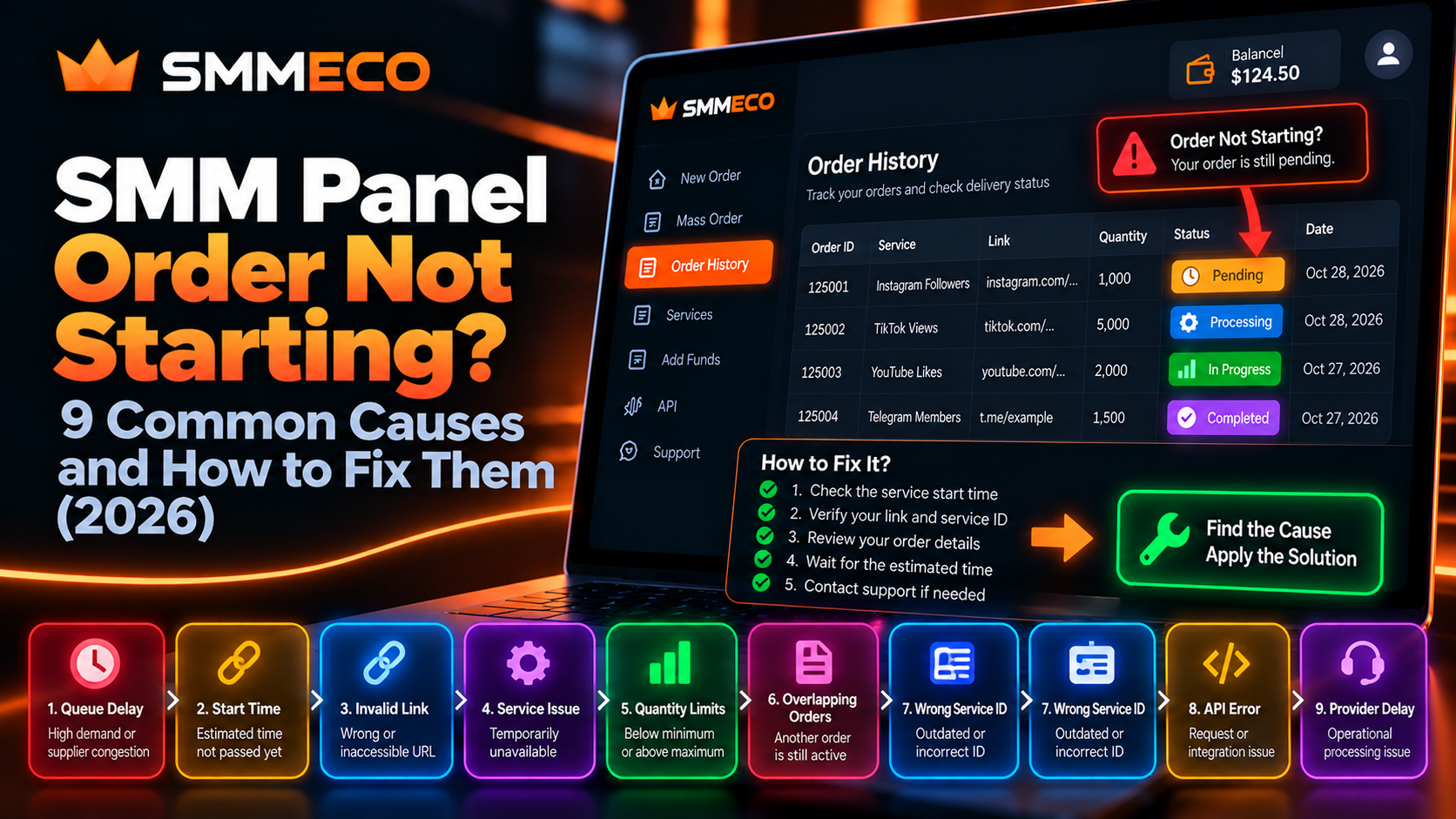
SMM Panel Order Not Starting? 9 Common Causes and How to Fix Them (2026)
You place an order through an SMM panel, receive an Order ID, and expect the service to begin within the advertised timeframe.
But when you check your dashboard, something seems wrong.
Your order still says Pending. The displayed quantity hasn't changed. Several hours have passed, and you aren't sure whether the order is delayed, stuck, or waiting for additional processing.
If your SMM panel order is not starting, there are several possible explanations.
The issue might involve service queues, an inaccessible target link, outdated service information, processing restrictions, or temporary supplier availability.
However, a delayed order does not automatically mean that the service has failed.
Understanding the difference between a normal waiting period and an actual processing problem can help you avoid duplicate charges, unnecessary support requests, and incorrect troubleshooting steps.
In this guide, we'll explain nine common reasons why an SMM panel order may not start, how to investigate each situation, and what information to provide when requesting assistance.
We'll also explain how customers and resellers can check order details using the tools documented by SMMECO.
Why Is My SMM Panel Order Not Starting?
An SMM panel order may not start because it is still queued, the target link is invalid or inaccessible, the selected service has restrictions, or the provider is experiencing a processing delay.
Other possible causes include outdated service identifiers, conflicting orders, unsupported quantities, and integration errors.
The first thing to establish is whether the order was actually accepted.
If an Order ID exists in your dashboard, the system has recorded a request. If no Order ID exists, you may be dealing with a submission problem rather than a delayed order.
These situations require different troubleshooting approaches.
Quick Answer: If an SMM panel order is not starting, first verify the Order ID, check the selected service's start-time estimate, confirm that the target link is accessible, and review the current order status. If the documented start period has passed, contact support with the relevant details. Do not immediately submit the same paid order again.
Before Troubleshooting: Check These Five Details
Before investigating individual causes, collect the basic information associated with your order.
1. Order ID
The Order ID identifies the specific submitted request.
If the order is not visible in your history, verify whether the submission succeeded before assuming it has been delayed.
2. Selected Service
Check the exact service that was chosen.
Two similarly named services can have different start times, supported targets, and quantity restrictions.
3. Submission Time
Record when the order was accepted.
You need this information to compare the elapsed time with the service's published start estimate.
4. Target Link
Confirm that the saved link leads to the intended profile, post, video, channel, or other supported destination.
5. Current Order Status
Review whether the panel reports Pending, Processing, In progress, Partial, Canceled, or another state.
A status provides useful context, but it does not necessarily reveal the underlying cause of a delay.
Once you have these details, you can investigate the most likely explanations.
9 Common Reasons an SMM Panel Order Is Not Starting
1. Your Order Is Waiting in a Processing Queue
One possible reason for an SMM order delay is that the request has entered a processing queue.
Some services handle incoming orders according to their operational capacity.
An order may be accepted before the upstream system begins processing it.
This can happen during periods of increased demand or temporary supplier congestion.
How to investigate:
- Confirm that the order appears in your account history.
- Check the current status.
- Compare the elapsed time with the advertised start estimate.
- Review any available service notices.
- Contact support if the applicable timeframe has been exceeded.
Important: A Pending status alone does not prove that a provider is experiencing unusually high demand. Queue congestion is one possible cause, not a confirmed diagnosis.
2. The Advertised Start Time Has Not Passed
Customers sometimes confuse an estimated start time with an estimated completion time.
These are different measurements.
Start Time describes when processing is expected to begin.
Completion Time describes how long fulfillment may take after the order enters processing.
For example, consider a hypothetical service with an estimated start time of 1–6 hours.
An order submitted two hours ago may still be within that estimated window.
If the service begins after four hours and requires additional processing time, the total duration may be longer than the initial start estimate.
These numbers are illustrative, not SMMECO's universal delivery guarantees.
How to investigate:
Read the selected service's description and identify whether the displayed estimate refers to starting or completing the order.
If the provider does not publish a start-time estimate, do not assume there is a universal timeframe for every SMM service.
SMMECO's Terms of Service explain that processing times can depend on service type, quantity, platform conditions, and supplier availability.
3. Your Target Link Is Incorrect or Inaccessible
A service cannot necessarily process a request if the submitted target is invalid or unavailable.
This is one of the most useful details to check because customers can often verify it independently.
Possible problems include:
- A misspelled URL.
- An incomplete profile or post link.
- A deleted or unavailable video.
- A username that has changed.
- A private account when public access is required.
- A channel or group link that the service does not support.
- A target that requires authentication the service cannot use.
How to investigate:
Open the original submitted URL in a normal browser session.
Check whether it leads to the intended destination.
Then compare the target type with the selected service description.
For example, a service requiring a public video URL may not support a channel homepage.
A valid-looking link is not always an eligible target.
Recommended action: If the submitted URL is incorrect, contact the provider to determine whether the existing order can be corrected. Do not assume the panel allows customers to edit an accepted order.
4. The Service Is Temporarily Unavailable
An SMM panel may show a service in its catalog while its operational availability changes.
Availability can be affected by supplier-side changes, maintenance, discontinued listings, or service-specific restrictions.
A previously working service may therefore behave differently from what a returning customer expects.
How to investigate:
Check whether the same Service ID remains listed in the current catalog.
Review the service's availability information and any provider announcements.
If the service has become unavailable, ask support about the status of the existing order and the remedies available under its terms.
What not to do: Do not select a different service and submit another payment before understanding what happened to the original request.
5. Your Order Quantity Does Not Meet Service Requirements
Every SMM service may have its own minimum and maximum quantity.
For example, a hypothetical service might accept requests between 100 and 10,000 units.
A request for 50 units would fall below the minimum, while a request for 15,000 units would exceed the maximum.
Most ordering interfaces attempt to validate these restrictions before accepting an order.
However, integration errors, outdated service lists, or provider-side changes can still create discrepancies.
How to investigate:
Compare the quantity recorded in the order with the current service specifications.
For API-based orders, verify that the submitted quantity meets the requirements of the exact Service ID.
If the order was accepted despite apparently invalid values, ask support to review the discrepancy.
Avoid changing or resubmitting the quantity without first verifying the original order's outcome.
6. An Earlier Order Is Still Active on the Same Target
Some services restrict multiple overlapping orders for the same target.
For example, a customer may have an existing order still marked In progress and then submit another order for the same destination.
Depending on the service, this can complicate tracking or interfere with supplier processing rules.
Overlapping orders may also make it difficult to determine which changes are associated with each request.
How to investigate:
Review your order history for earlier orders involving the same target.
Check whether those orders remain active and whether the service description includes restrictions on simultaneous requests.
Recommended action: If overlapping orders are not supported, contact the provider to clarify how the existing requests should be handled.
Do not assume that placing additional orders will make the first order start faster.
For related limitations, read the SMM Panel Refill, Cancel & Drop Policies Guide.
7. The Service ID Is Outdated or Incorrect
A Service ID identifies a particular listing within an SMM panel's catalog.
For example, Service ID 205 on one provider may represent a different service from Service ID 205 on another provider.
This matters particularly for resellers managing multiple suppliers.
A business may accidentally use an identifier saved from an outdated catalog or associate a local service with the wrong upstream supplier.
How to investigate:
Verify that the Service ID matches the intended provider and service.
Check the current service list rather than relying on an old spreadsheet.
If the order was submitted through an API, verify the mapping between the local service and the external supplier's Service ID.
Important distinction: An incorrect Service ID often causes submission failure, but it may also result in the wrong available service being selected. If an order was accepted, inspect the recorded service before retrying.
8. An API or Automated Ordering Error Occurred
Reseller businesses often use APIs to submit and track orders.
An integration problem can create a situation where a customer believes an order was submitted, but the upstream supplier never recorded it.
Possible explanations include:
- Incorrect API credentials.
- Invalid request parameters.
- An unavailable Service ID.
- Incorrect target data.
- Request timeouts.
- Parsing errors.
- Unexpected provider responses.
- A failed local database update.
These are general integration failure scenarios, not confirmed incidents involving SMMECO.
How to investigate:
First, inspect the provider response and local submission logs.
Determine whether the upstream provider returned an accepted Order ID.
If an Order ID was returned, check its current status before sending another request.
If the API request timed out, do not assume it failed.
The supplier may have accepted the request even though your application did not receive the response.
This is especially important for paid operations, where automatic retries can create duplicate orders.
SMMECO's API Integration Guide for Resellers explains the broader concepts of supplier connectivity, order submission, and automated management.
9. The Provider Is Experiencing an Operational Delay
Sometimes an order remains unstarted even though the customer submitted the correct information.
This may be caused by an internal processing problem, temporary supplier disruption, or another operational issue outside the customer's control.
Customers generally cannot identify the exact internal cause from a Pending label alone.
How to investigate:
Confirm that the target, Service ID, order quantity, and applicable start-time conditions are correct.
If those checks reveal no obvious issue, contact the provider.
Include the existing Order ID rather than placing another request.
For SMMECO customers, the platform's terms direct users to contact support through their account for significantly delayed orders.
The provider can review the request and determine what information is available about its processing state.
How to Fix an SMM Panel Order Stuck on Pending
If your order is stuck, follow this practical troubleshooting process in order.
Step 1: Confirm the Order Was Accepted
Open your order history.
If the request appears with an Order ID, it has been recorded by the system.
If it does not appear, investigate the submission result, account activity, and any available payment or API records.
Do not confuse a missing order with a Pending order.
Step 2: Check the Actual Waiting Period
Find the order's submission timestamp.
Compare it with the selected service's published conditions.
For example, an order submitted at 10:00 AM with a hypothetical six-hour estimated start period would reach that estimate at approximately 4:00 PM.
That does not guarantee processing will start exactly at 4:00 PM.
Step 3: Verify the Submitted Target
Open the exact URL stored in the order record.
Check accessibility, target type, and whether the destination has changed since submission.
Do not silently substitute a different link.
Step 4: Review Previous Orders
Look for active requests involving the same target or service.
If there are multiple overlapping orders, verify whether the service permits them.
Step 5: Check the Service Information
Review its current listing, quantity limits, availability, and any restrictions.
For automated orders, confirm the selected Service ID.
Step 6: Review the Latest Order Status
Check whether the order has moved into Processing or In progress.
If the status has changed, review the available tracking details rather than continuing to treat it as an unstarted order.
Step 7: Contact Support With Evidence
If the applicable start estimate has passed and there is no clear customer-side issue, submit a support request.
Include the Order ID, selected service, current status, elapsed time, and a concise description.
Step 8: Verify the Outcome Before Retrying
Wait for a confirmed outcome from the ordering system or support before submitting another paid request for the same unresolved order.
The original request may still be active.
SMM Order Not Starting vs Order Not Delivering
These situations sound similar, but they are not necessarily the same.
Order Not Starting
The order has been accepted but has not visibly entered an active processing stage.
The main investigation concerns acceptance, start-time estimates, service eligibility, and supplier availability.
Order Not Delivering
The system may already report Processing or In progress, but the customer does not observe the expected changes.
This requires a different investigation involving recorded starting counts, remaining quantities, delivery conditions, and the current target state.
Order Marked Completed but Results Are Missing
A Completed status indicates the system reports the order as fulfilled.
If the observed outcome differs, the customer should investigate the recorded quantity, applicable service conditions, and possible platform-side count adjustments.
A Completed status alone does not guarantee permanent or authentic engagement.
Key Difference: An order that has not started requires a processing investigation. An order that has started but appears incomplete requires fulfillment verification.
Can You Cancel an SMM Panel Order That Has Not Started?
Possibly, but a Pending order is not automatically cancelable.
The selected service may have specific cancellation rules.
Some providers support cancellation requests before active processing begins.
Others may restrict cancellation after the request has been forwarded to an upstream supplier.
The presence of a Cancel option does not necessarily mean the request has been approved.
Does Cancellation Automatically Return the Money?
Not always.
The financial outcome depends on the provider's terms, the amount already processed, the account's billing records, and applicable consumer rights.
A canceled order may involve an internal balance adjustment or another remedy depending on the circumstances.
To understand these differences, review SMMECO's Terms of Service and our Refill and Cancellation Policy Guide.
How to Check Whether SMMECO Has Accepted Your Order
SMMECO publishes API documentation describing how compatible applications can retrieve order information.
The documented API endpoint is:
https://smmeco.com/api/v2
The documentation identifies a status operation using the following parameters:
key— Private API key.action—status.order— The Order ID being checked.
The documented response structure contains fields such as:
chargestart_countstatusremainscurrency
These fields help developers interpret the supplier's recorded order information.
For example, SMMECO's API documentation includes a sample response where an order has a Partial status and a recorded remaining quantity.
That sample demonstrates the response format, not a real customer incident.
Can SMMECO Check Multiple Orders Through Its API?
Yes.
Its published documentation includes a multiple-order status operation that accepts comma-separated Order IDs, up to 100 in one request.
This can be useful for resellers investigating several submitted orders.
However, the API response must be interpreted correctly.
An error such as Incorrect order ID does not mean the order is automatically canceled.
It means the lookup failed for the specified identifier.
The developer should determine whether the identifier is correct and whether the request was made against the appropriate account and provider.
How Should Resellers Handle API Timeouts?
When an API order-creation request times out, first inspect local logs and available order records.
Then determine whether the supplier accepted the original request.
If the provider returned an Order ID but the reseller system failed to store it, the correct solution is generally to reconcile that record rather than create another order.
If the submission result remains uncertain, contact the supplier with the available request details.
Avoid automatic paid-order retries unless the integration has a verified method for preventing duplicates.
Three Realistic SMM Panel Order Delay Scenarios
The following examples are hypothetical troubleshooting situations, not actual SMMECO customer cases.
Scenario 1: Pending Order After Two Hours
A customer places an order at 11:00 AM.
At 1:00 PM, the status remains Pending.
The selected service has an advertised start estimate of 1–6 hours.
Assessment: The order is still within the published estimated start period.
Recommended action: Verify the link and monitor the order. A delay beyond the estimate would justify further investigation, but the current status alone does not establish an error.
Scenario 2: Correct Order ID, Deleted Target
An order is accepted successfully.
Later, the customer deletes the target post.
The order remains Pending.
Assessment: The submitted target may no longer meet the service's accessibility requirements.
Recommended action: Contact support and explain that the original destination is no longer available. Ask whether cancellation, correction, or another remedy is possible.
Submitting a different link as a new order does not resolve the original request automatically.
Scenario 3: API Request Timed Out, but Account Balance Changed
A reseller submits an order through an API.
The connection times out before the application receives a response.
The reseller notices a change in the supplier balance.
Assessment: The transaction outcome is uncertain. The balance change alone does not establish which order was accepted.
Recommended action: Inspect the supplier order history and local request logs, reconcile any accepted Order ID, and contact the supplier if necessary.
Do not blindly resend the request.
These three scenarios illustrate an important principle: the correct solution depends on identifying what actually happened, not simply reacting to a status label.
How to Report an SMM Panel Order That Is Not Starting
A clear support message can help the provider investigate the correct order.
Instead of writing only "My order is not working," include relevant information.
Example Support Request
Subject: Order Not Starting — Status Review
Order ID: 125001
Service ID: 305
Submission Time: October 28, 2026, 10:00 AM
Current Status: Pending
Issue: The order has not started, and the published estimated start period has passed.
Checks Completed: The original target is accessible, and the selected service information has been reviewed.
Request: Please check the order's current processing state and advise whether any additional information is required.
All identifiers and timestamps above are illustrative.
For multiple affected orders, provide each Order ID and explain whether they involve the same issue.
Never include passwords, private API credentials, or sensitive payment details in support messages.
How Resellers Can Reduce SMM Order Processing Problems
Resellers handling customer orders through upstream suppliers need accurate records and reliable order reconciliation.
These practices can reduce avoidable administrative errors.
Maintain a Current Service Catalog
Regularly verify supplier Service IDs, prices, quantity limits, and availability.
Do not rely indefinitely on imported service information.
Store Both Customer and Supplier Order IDs
When your own panel assigns one identifier and the upstream supplier returns another, retain both.
This allows support requests to be matched correctly.
Record Submission Results
Store relevant response information, request timestamps, and errors securely.
A failed local database update should not automatically become another paid order submission.
Track Unresolved Orders
Maintain an internal list of orders that have passed their published start estimates.
This allows your team to investigate specific exceptions instead of repeatedly checking every order manually.
Separate Status Checks From New Order Requests
Checking an order's status should not create another order.
Keep read-only tracking operations separate from paid submission actions.
Avoid Unsupported Delivery Promises
If the supplier provides an estimated start time, do not present it to customers as a guaranteed completion deadline.
Resellers should communicate the conditions actually supported by the supplier.
Review Cancellation and Refund Records
If an order is canceled or partially fulfilled, reconcile its final charge and any confirmed account adjustment before communicating the outcome.
How Long Should You Wait Before Contacting SMM Panel Support?
There is no universal waiting period that applies to every SMM panel service.
The appropriate time depends on the selected service's published conditions.
A service with an estimated start period of several hours should not automatically be treated as failed after a few minutes.
Conversely, if a service's stated start estimate has passed without progress, a support review may be appropriate.
If no start estimate is published, review the provider's terms and contact support when the delay becomes significant.
For SMMECO, the published terms explain that users should contact support with the relevant Order ID when an order is significantly delayed.
The important distinction is between a reasonable waiting period and a verified operational problem.
Can Changing Your SMM Panel Service Fix a Stuck Order?
Not automatically.
Switching to a different service does not cancel or repair the original request.
If you place another order while the first remains active, both may eventually be processed.
This can create duplicate charges or confusing order records.
A safer approach is to investigate the existing request first.
If the selected service is unavailable, ask support about the applicable cancellation or adjustment process.
Only consider a new order after the original situation has been clarified and the replacement service has been evaluated independently.
Important Social Media Platform Risks
An SMM panel's ability to process an order is separate from whether the underlying activity complies with the relevant social media platform's rules.
Certain third-party services that artificially increase engagement may violate platform policies.
For example, YouTube's Fake Engagement Policy restricts artificial increases in views, likes, subscribers, and related metrics.
A delayed order, completed order, or refill guarantee does not prove that an activity is permitted or risk-free.
Customers should consider platform policies, authorization, and the legitimacy of a service before using third-party engagement tools.
Authentic content, legitimate advertising, and genuine community engagement remain important parts of sustainable social media marketing.
Frequently Asked Questions About SMM Panel Orders Not Starting
Why is my SMM panel order stuck on Pending?
Possible causes include a processing queue, an estimated start period that has not yet passed, an invalid target, service restrictions, or supplier delays. Check the Order ID, target link, and selected service information before contacting support.
How do I fix an SMM panel order that is not starting?
Verify that the order was accepted, review the advertised start time, check the original link, confirm the service requirements, and inspect the current status. Contact support if the applicable timeframe has passed.
Does Pending mean my SMM panel order has failed?
No. Pending usually indicates that an order has been received and is awaiting processing. The exact meaning and reason for the delay depend on the provider.
Why is my SMM panel order not processing after 24 hours?
The service may have a long start estimate, be affected by temporary supplier availability, or require additional investigation. Twenty-four hours is not a universal failure threshold. Compare the elapsed time with the selected service's conditions.
Can I cancel an SMM order that has not started?
Cancellation depends on the selected service and its current processing stage. A Pending status does not automatically guarantee cancellation eligibility.
What should I do if my SMM order was charged but no Order ID appeared?
Review the order history, balance transactions, and any available API response before attempting another submission. If the outcome remains unclear, contact support to investigate the transaction.
Can an incorrect Service ID prevent my order from starting?
Yes. An invalid or outdated Service ID may cause an order submission to fail. If the identifier matches a different service, it may also result in an unintended selection. Always verify the current provider catalog.
Does placing the same order again make it start faster?
No. A duplicate request does not resolve the original order's processing problem and may result in additional charges or overlapping-order complications.
Can a private Instagram account cause an order problem?
Some services require a publicly accessible target. If the selected service cannot access the submitted account or content, processing may be affected. Check its published requirements.
How do I check an SMMECO order through the API?
SMMECO documents an order-status operation using an API key, the action status, and an Order ID. The response can include status, charge, starting count, remaining quantity, and currency information.
What should I send to SMM panel support?
Provide the Order ID, selected service, submission time, current status, a concise description of the problem, and the relevant checks you have completed. Do not share your password or API key.
Is a stuck order automatically eligible for a refund?
No. The available remedy depends on the provider's terms, actual processing outcome, service conditions, and applicable legal rights. A Pending status alone does not establish a specific refund amount.
Final Thoughts: What to Do When an SMM Panel Order Won't Start
An SMM panel order that does not start can be frustrating, particularly when a customer expects the service to begin within a published timeframe.
However, not every delayed order represents a failure.
Some orders are still within their estimated start period. Others may be waiting in a queue, affected by target accessibility, or delayed by service availability.
The most effective troubleshooting approach is to verify the available evidence before taking action.
Start with the Order ID, submission time, target link, service details, and current status.
Then compare those details with the selected provider's conditions.
If the order remains unresolved beyond its applicable estimated start period, contact support with a clear description rather than creating duplicate requests.
SMMECO provides account-based order management and documents API operations for checking order information.
To explore its features and current service conditions, visit SMMECO — Global SMM Panel.
Key takeaway: When an SMM panel order is not starting, identify the actual cause before attempting a fix. Accurate order records, verified service information, and clear communication are more useful than repeatedly submitting the same request.