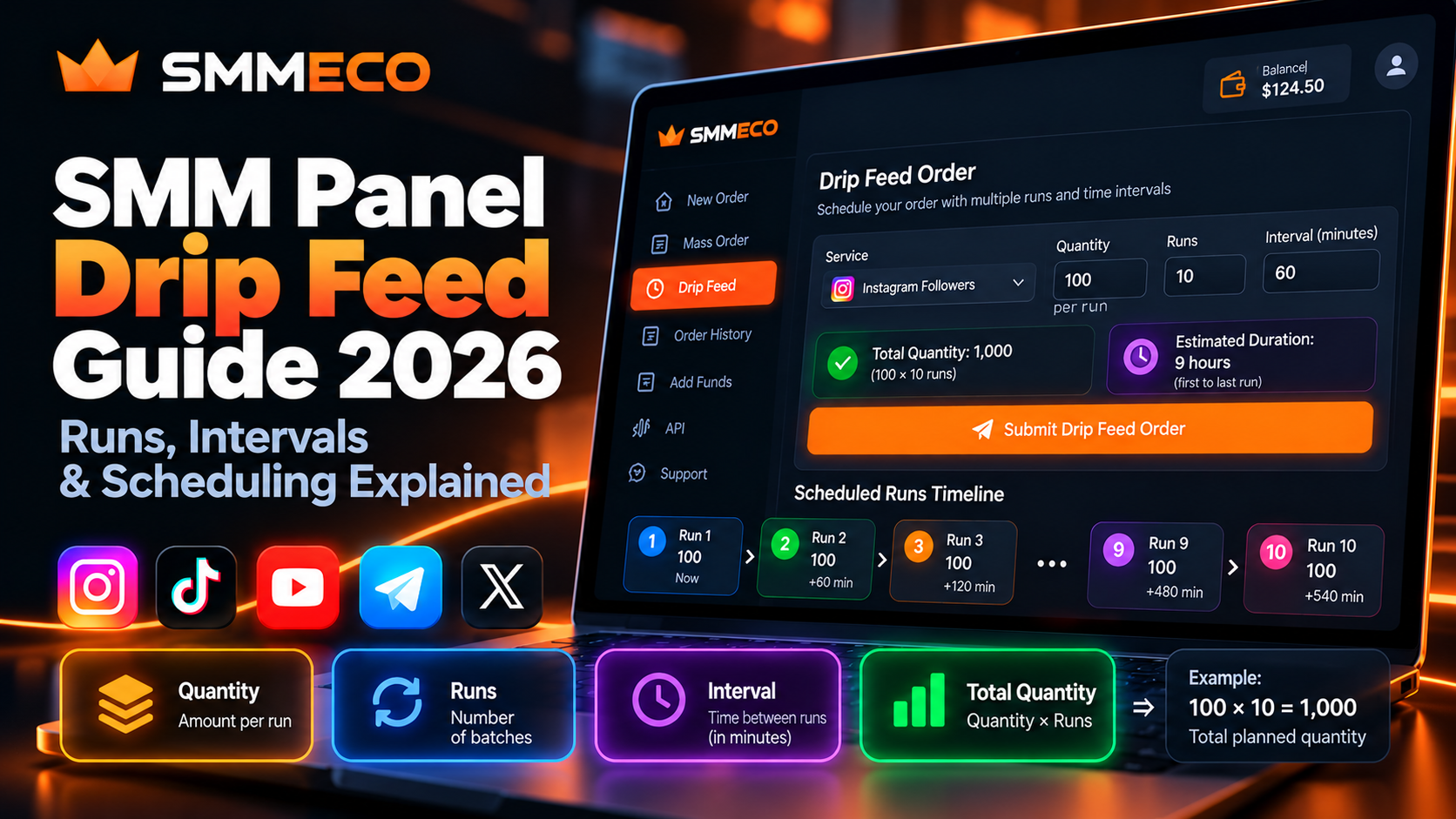
SMM Panel Drip Feed Guide 2026: Runs, Intervals, Quantity & Scheduling Explained
Imagine placing an order through an SMM panel and discovering three unfamiliar settings: Quantity, Runs, and Interval.
At first glance, these fields may seem straightforward. However, entering the wrong values can create an order much larger than expected, change the intended schedule, or result in additional charges.
This is why understanding SMM panel drip feed is important before using scheduled ordering features.
Drip-feed functionality allows eligible service orders to be divided into smaller batches that are scheduled over time, instead of submitting the entire requested quantity through a single immediate process.
For SMM resellers, agencies, and customers managing multiple requests, this can provide additional control over order scheduling.
Platforms such as SMMECO describe drip-feed functionality for eligible services, while their API documentation includes optional parameters for runs and intervals.
But how do these settings actually work? Does Quantity mean the total order or the amount per run? And how can you estimate the cost and scheduling period before submitting an order?
This guide explains the calculations, practical examples, common errors, and important limitations of SMM panel drip-feed ordering.
What Is Drip Feed in an SMM Panel?
Drip feed is an SMM panel scheduling feature that divides an eligible service request into multiple runs separated by specified time intervals.
Instead of submitting one large quantity through a single fulfillment request, drip feed creates a schedule involving smaller batches.
In the commonly used per-run model, users configure three values:
- Quantity: The requested amount for each run.
- Runs: The number of scheduled batches.
- Interval: The time between scheduled runs, usually expressed in minutes.
These settings determine how many units are requested and how the system schedules them.
For example, consider the following hypothetical configuration:
Quantity: 100
Runs: 10
Interval: 60 minutes
Under the standard per-run model, this represents ten scheduled batches of 100 units each, with a one-hour interval between scheduled starts.
The total planned quantity is 1,000 units.
However, not every SMM service supports drip-feed ordering, and providers may apply different validation and scheduling rules.
Quick Answer: SMM panel drip feed is an ordering option that schedules repeated batches. In a conventional setup, total quantity equals Quantity multiplied by Runs, while Interval controls the time between scheduled runs.
How Does SMM Panel Drip Feed Work?
A drip-feed order begins with the customer selecting an eligible service.
The customer then configures the desired quantity for each run, the number of runs, and the interval between them.
Once the order is accepted, the panel manages the scheduled requests according to the provider's system.
A simplified workflow looks like this:
Service Selection → Drip-Feed Settings → Order Validation → Scheduled Runs → Order Tracking
Each stage serves a different purpose.
Service selection determines the service being requested.
Drip-feed settings define the desired schedule.
Validation checks whether the requested configuration meets the provider's rules.
The scheduling system then handles eligible runs.
Finally, the order-management system records the available processing information.
An important distinction is that scheduled delivery and actual fulfillment are not necessarily identical.
A batch scheduled to begin at a certain time may still require additional processing time.
Therefore, drip feed should be understood as a scheduling tool rather than a guarantee of exact delivery timing.
Understanding Quantity in SMM Drip Feed
One of the most important questions is whether Quantity means the total requested amount or the amount assigned to each run.
In many conventional SMM panel implementations, Quantity represents the number of units requested per run.
This differs from an ordinary one-time order, where Quantity commonly represents the entire requested amount.
Example: Regular Order vs Drip-Feed Order
Consider a standard order:
Quantity: 1,000
Total requested quantity: 1,000
Now consider a drip-feed configuration:
Quantity: 1,000
Runs: 5
Total planned quantity: 5,000
Under the per-run model, the second configuration requests five times as many units.
This difference can substantially affect the estimated cost.
Why Is Quantity Per Run Important?
When planning a drip-feed order, customers should identify the total amount they intend to request before selecting the number of runs.
Suppose the desired total is 2,000 units across ten runs.
Under the per-run model:
Quantity per Run = Total Quantity ÷ Number of Runs
2,000 ÷ 10 = 200
The appropriate per-run quantity would therefore be 200, subject to the service's limits.
Always confirm the provider's interpretation before submitting a paid order.
What Are Runs in an SMM Panel?
Runs represent how many scheduled batches a drip-feed order will attempt to process.
For example:
- 3 runs means three scheduled batches.
- 5 runs means five scheduled batches.
- 10 runs means ten scheduled batches.
- 20 runs means twenty scheduled batches.
The number of runs affects the planned total quantity when the provider uses a per-run model.
How to Calculate Total Drip-Feed Quantity
The basic formula is:
Total Planned Quantity = Quantity per Run × Number of Runs
Let's use three hypothetical configurations.
Example A: Small Batch Schedule
Quantity per run: 50
Runs: 6
Total planned quantity: 300
Example B: Medium Batch Schedule
Quantity per run: 200
Runs: 10
Total planned quantity: 2,000
Example C: Larger Batch Schedule
Quantity per run: 500
Runs: 12
Total planned quantity: 6,000
These examples demonstrate the calculations only. They are not actual SMMECO service recommendations or live service limits.
A provider may impose restrictions on quantities, runs, total volume, or supported service types.
What Does Interval Mean in SMM Drip Feed?
Interval is the configured time gap between successive scheduled runs.
In many SMM panel systems, the interval is entered in minutes.
For example:
- Interval 30 = 30 minutes.
- Interval 60 = 1 hour.
- Interval 120 = 2 hours.
- Interval 360 = 6 hours.
- Interval 720 = 12 hours.
- Interval 1440 = 24 hours.
The interval controls scheduling frequency.
It does not independently determine the total number of units requested.
Does a Longer Interval Reduce the Quantity?
No.
Suppose two hypothetical configurations both use:
Quantity: 100
Runs: 10
The first configuration has an interval of 60 minutes.
The second has an interval of 120 minutes.
Both plan a total of 1,000 units under the standard per-run model.
The difference is the scheduled time between runs, not the amount requested.
Does Interval 60 Guarantee Delivery Every Hour?
Not necessarily.
An interval of 60 minutes commonly means that consecutive runs are scheduled one hour apart.
It does not guarantee that each batch will finish within one hour.
Actual processing may depend on the selected service, provider queue, system availability, and other operational conditions.
How Long Does an SMM Drip-Feed Order Take?
This is a frequently misunderstood calculation.
A drip-feed schedule has two different time concepts:
Scheduled Run Span: The time between the first and last scheduled run starts.
Actual Completion Time: The time required for all accepted runs to finish processing.
These are not necessarily equal.
Calculating the Scheduled Run Span
Assuming the first run is scheduled immediately and subsequent runs begin at fixed intervals:
First-to-Last Run Span = (Runs − 1) × Interval
For example:
Runs: 10
Interval: 60 minutes
Calculation:
(10 − 1) × 60 = 540 minutes
That equals nine hours between the first and last scheduled starts.
It does not mean the entire order will definitely finish in nine hours.
Example: Four Scheduled Runs
Imagine a schedule beginning at 10:00 AM.
Run 1: 10:00 AM
Run 2: 11:00 AM
Run 3: 12:00 PM
Run 4: 1:00 PM
The scheduled start-to-start span is three hours.
The last batch may still take additional time to complete.
This distinction matters when estimating order duration for customers or internal reporting.
How to Calculate SMM Drip-Feed Order Cost
Drip-feed orders may involve multiple runs, but pricing is usually connected to the total quantity requested and the selected service's rate.
For a service priced per 1,000 units, a common estimate is:
Estimated Cost = (Total Planned Quantity ÷ 1,000) × Rate per 1,000
Example: Calculating a Drip-Feed Budget
Consider the following hypothetical values:
Quantity per run: 250
Runs: 8
Interval: 120 minutes
Rate per 1,000 units: $0.75
First, calculate the total quantity:
250 × 8 = 2,000 units
Then calculate the estimated price:
(2,000 ÷ 1,000) × $0.75 = $1.50
The estimated base cost is $1.50.
The interval does not directly change this quantity-based calculation.
However, actual billing depends on the provider's pricing rules, account conditions, service limits, and applicable charges.
The example does not represent a live SMMECO price.
When Is a Drip-Feed Order Charged?
Some SMM panels charge or reserve the estimated total when the scheduled order is submitted.
Others may have different accounting procedures.
Customers should confirm the applicable charging model before creating an order.
The fact that the system schedules future runs does not necessarily mean it will charge for each run separately.
For broader pricing concepts, read our Wholesale SMM Panel Pricing Guide.
How to Set Up Drip Feed in an SMM Panel
The exact steps vary by provider, but the general process follows a similar structure.
Step 1: Choose a Service That Supports Drip Feed
Begin by reviewing the current service catalog.
Not every service supports scheduling.
Some providers show drip-feed fields only after an eligible service has been selected.
Before continuing, verify the service description, supported target type, and ordering limits.
Step 2: Verify the Target Requirements
Check that the target link is supported by the selected service.
A service may require a particular post, profile, video, channel, or other destination.
Incorrect links can cause processing problems regardless of the scheduling settings.
Step 3: Determine Your Total Planned Quantity
Decide how many units you intend to request in total.
This helps prevent confusion when configuring a per-run quantity.
Remember that in a typical per-run model:
Total Quantity = Quantity × Runs
Step 4: Configure Quantity and Runs
Enter the values required by the service.
Check the provider's minimum and maximum quantities.
Some providers apply limits to each run, while others also restrict the combined total.
Never assume that satisfying a per-run minimum automatically makes the entire configuration valid.
Step 5: Set the Interval
Choose the interval allowed by the provider.
Confirm whether the unit is minutes.
Review any minimum interval requirements or other scheduling restrictions.
Step 6: Review the Estimated Total
Before submitting, calculate the total quantity and estimated cost.
Also verify the intended number of runs.
A common mistake is entering the entire desired quantity into a field that the provider interprets as quantity per run.
Step 7: Submit and Record the Order
After confirming the settings, submit the order through the supported interface.
Save the Order ID and relevant configuration details.
If the panel provides scheduled-run information, retain it for troubleshooting.
Step 8: Monitor the Order
Use the available order-management tools to review the current state.
If the order is delayed or partially fulfilled, check the applicable service conditions before requesting support.
Avoid submitting duplicate orders while an earlier request's outcome remains unclear.
Does SMMECO Support Drip-Feed Orders?
SMMECO identifies drip feed as an available feature for eligible SMM services.
According to its public website, drip feed allows supported orders to be divided into smaller batches over a selected period.
The feature is subject to the specific service's availability.
SMMECO also publishes API documentation that includes optional scheduling parameters.
These parameters are relevant to developers and resellers building compatible order-management integrations.
However, customers should confirm the currently supported services, accepted limits, and precise interface behavior before creating a scheduled order.
SMMECO API Drip-Feed Parameters Explained
The official SMMECO API documentation identifies the following endpoint:
https://smmeco.com/api/v2
Its documented order-creation operation uses HTTP POST and includes these parameters:
key: Private API credential associated with the account.
action: The operation being requested, such as add.
service: The selected Service ID.
link: The target link.
quantity: The requested quantity.
runs: Optional number of runs to deliver.
interval: Optional interval in minutes.
Example Drip-Feed Configuration
Consider this illustrative request information:
action = add
service = 123
quantity = 100
runs = 10
interval = 60
Under the conventional per-run interpretation, this represents ten scheduled runs of 100 units, for a planned total of 1,000 units.
The Service ID is hypothetical.
The exact supported request format, service eligibility, limits, and treatment of Quantity must be verified in the current SMMECO environment.
The public API reference documents the optional runs and interval fields but does not, by itself, establish all the operational rules for every service.
What Should Developers Validate?
Before submitting a scheduling request through an API integration, a developer should check:
- Whether the Service ID exists and is available.
- Whether the service supports drip-feed ordering.
- Whether the requested quantity satisfies applicable limits.
- Whether the number of runs is permitted.
- Whether the interval meets the provider's requirements.
- Whether the combined quantity and estimated charge are acceptable.
- Whether the target link meets the service conditions.
- Whether an earlier request with an uncertain outcome already exists.
For a broader explanation of authentication, supplier integration, and order automation, read our SMM Panel API Integration Guide for Resellers.
Common SMM Panel Drip-Feed Errors
Understanding common configuration errors is important for both customers and reseller businesses.
1. Entering Total Quantity as Quantity per Run
Problem: The customer wants 1,000 units but enters Quantity 1,000 with ten runs.
Under a per-run model, that configuration requests 10,000 units.
Solution: Confirm whether Quantity represents the amount per batch or the overall total before submitting.
2. Using an Unsupported Service
Problem: The selected service does not support drip-feed scheduling.
Solution: Check whether the option is available for the specific service.
Do not assume an ordinary quantity-based order automatically supports runs and intervals.
3. Choosing an Invalid Interval
Problem: The requested interval is outside the service's permitted range.
Solution: Review the current scheduling requirements.
Providers may restrict intervals to avoid unsupported scheduling configurations.
4. Exceeding Maximum Quantity
Problem: The configured total exceeds the service's allowed amount.
Solution: Calculate Quantity × Runs and verify the relevant limits.
Be aware that some providers also enforce separate per-run restrictions.
5. Confusing Scheduled Start Time With Completion Time
Problem: The customer assumes every batch will finish exactly when its scheduled run begins.
Solution: Treat interval calculations as scheduling estimates, not guaranteed fulfillment deadlines.
6. Submitting an Overlapping Order
Problem: Another request is submitted for the same target while an earlier drip-feed schedule remains active.
Solution: Review the original order's status and the provider's restrictions before creating another request.
7. Retrying After an Unclear API Response
Problem: The API request times out, and the reseller immediately sends the same paid request again.
Solution: Verify whether the first order was accepted before retrying.
A timeout does not necessarily mean the provider rejected the order.
Drip Feed vs Mass Order: What Is the Difference?
Drip Feed and Mass Order are different SMM panel functions.
Drip Feed is concerned with scheduling repeated batches over time.
Mass Order is concerned with submitting multiple individual orders together.
For example, a mass order may contain several separate target links and service IDs in one submission.
A drip-feed order may instead involve one eligible target and repeated scheduled runs.
Some platforms may offer additional ways to combine bulk submission with scheduling, but this should not be assumed without reviewing the actual interface.
Mass Order does not automatically provide drip-feed functionality.
Likewise, drip feed is not necessarily a wholesale pricing option.
Drip Feed vs Slow Delivery: Are They the Same?
Not necessarily.
A service described as slow delivery may use its own processing pace without providing customer-configurable scheduling.
Drip feed, by contrast, commonly exposes settings for the number of runs and the interval between them.
A drip-feed schedule may initiate batches at predefined times, but each batch can still be processed at a different actual speed.
Therefore, choosing a longer interval does not guarantee smooth or continuous delivery.
Users should evaluate the published service behavior rather than assuming that every scheduled order follows an identical delivery pattern.
Can Drip Feed Prevent Social Media Account Risks?
No.
Drip-feed scheduling does not establish that purchased engagement is genuine, permitted, or safe.
Some third-party engagement services may violate social media platform rules, regardless of whether they are delivered immediately or in scheduled batches.
Scheduling a request does not turn artificial engagement into authentic audience activity.
It also cannot guarantee better organic reach, permanent retention, monetization eligibility, or protection from account restrictions.
Before using third-party engagement services, customers should review the applicable platform policies and service terms.
Drip feed should be evaluated as an ordering and scheduling feature, not as a method of guaranteeing account safety.
What Happens If a Drip-Feed Order Stops Before All Runs Finish?
An order may be interrupted before its planned schedule finishes.
Possible reasons include provider availability, invalid target information, service restrictions, or processing errors.
The final result depends on the provider's system.
Some systems may report partially fulfilled orders.
Others may provide additional run-specific information or apply financial adjustments according to their policies.
Can You Cancel Remaining Drip-Feed Runs?
Cancellation is not universally available.
The provider may restrict cancellation after a particular processing stage or apply different rules to remaining scheduled requests.
Never assume that an order with future runs can automatically be canceled or fully refunded.
Does Drip Feed Include Refill Protection?
Not automatically.
Refill eligibility depends on the selected service's conditions.
A drip-feed configuration does not independently create a refill guarantee.
For more details, read our SMM Panel Refill, Cancel & Drop Policies Guide.
Drip-Feed Scheduling Checklist for SMM Resellers
Resellers managing scheduled orders should maintain records that distinguish the requested schedule from the actual fulfillment outcome.
For each order, record:
- Supplier name and Service ID.
- Original target link.
- Quantity per run.
- Number of scheduled runs.
- Interval in minutes.
- Expected total quantity.
- Estimated charge.
- Accepted Order ID.
- Submission timestamp.
- Current order status.
- Any reported errors or financial adjustments.
These records help businesses investigate discrepancies without relying on incomplete customer messages.
For API integrations, validate the schedule before submitting paid requests and preserve the provider's response.
A reseller should not promise an exact completion time when the supplier only documents the scheduling interval.
Frequently Asked Questions About SMM Panel Drip Feed
What is drip feed in an SMM panel?
Drip feed is a feature that schedules an eligible order in multiple batches instead of submitting the entire amount in one immediate request. Users commonly configure quantity, runs, and interval.
What does Runs mean in SMM drip feed?
Runs indicates how many scheduled batches the order includes. Under the conventional per-run model, ten runs means ten batches.
What does Interval 60 mean?
Interval 60 generally means 60 minutes between scheduled runs. It does not guarantee that each batch will finish within 60 minutes.
Is Quantity the total amount in drip feed?
In many SMM panel systems, Quantity represents the amount per run. The planned total is then Quantity multiplied by Runs. Always verify the provider's implementation.
What does Quantity 100 and Runs 10 mean?
Under the standard per-run model, it represents ten batches of 100 units, giving a planned total of 1,000 units.
How much does an SMM drip-feed order cost?
For a service priced per 1,000 units, a common estimate is Total Quantity divided by 1,000, multiplied by the service rate. Actual charges depend on the provider's pricing rules.
Does drip feed make delivery slower?
It schedules runs at specified intervals, but actual delivery speed depends on the service. Drip feed does not guarantee that each batch finishes at a particular time.
Can I use drip feed for Instagram services?
Some SMM panel services associated with Instagram may support drip-feed settings. Eligibility depends on the individual service and provider.
Does every SMM panel offer drip feed?
No. Drip-feed availability varies between providers and service types.
Can I edit a drip-feed order after submission?
That depends on the provider. Some systems may restrict modifications after an order has been accepted or processing has started.
Can drip feed and mass order be used together?
Some platforms may support workflows combining multiple submissions with scheduling, but these are separate features. Verify the provider's actual capabilities.
Does SMMECO support drip-feed orders?
SMMECO publicly describes drip-feed functionality for eligible services. Its API documentation also includes optional runs and interval parameters for supported order requests.
Final Thoughts: Understanding Drip Feed Before Ordering
SMM panel drip feed can make scheduled order management more flexible, particularly when users need multiple batches rather than a single immediate request.
However, using the feature correctly requires understanding three essential values:
Quantity describes the requested amount, commonly per run.
Runs defines the number of scheduled batches.
Interval determines the configured time between them.
In the conventional per-run model:
Total Quantity = Quantity × Runs
And when estimating the time between the first and last scheduled starts:
Scheduled Run Span = (Runs − 1) × Interval
These calculations help prevent mistakes, but actual service availability, processing time, pricing, and cancellation conditions must always be checked with the provider.
SMMECO describes drip-feed functionality for eligible services and documents optional scheduling parameters within its API.
For users researching these features, visit SMMECO to explore the platform and review the current service conditions.
Key takeaway: Drip feed is a scheduling tool. Understanding quantity, runs, intervals, and provider limitations is more important than simply enabling the feature.