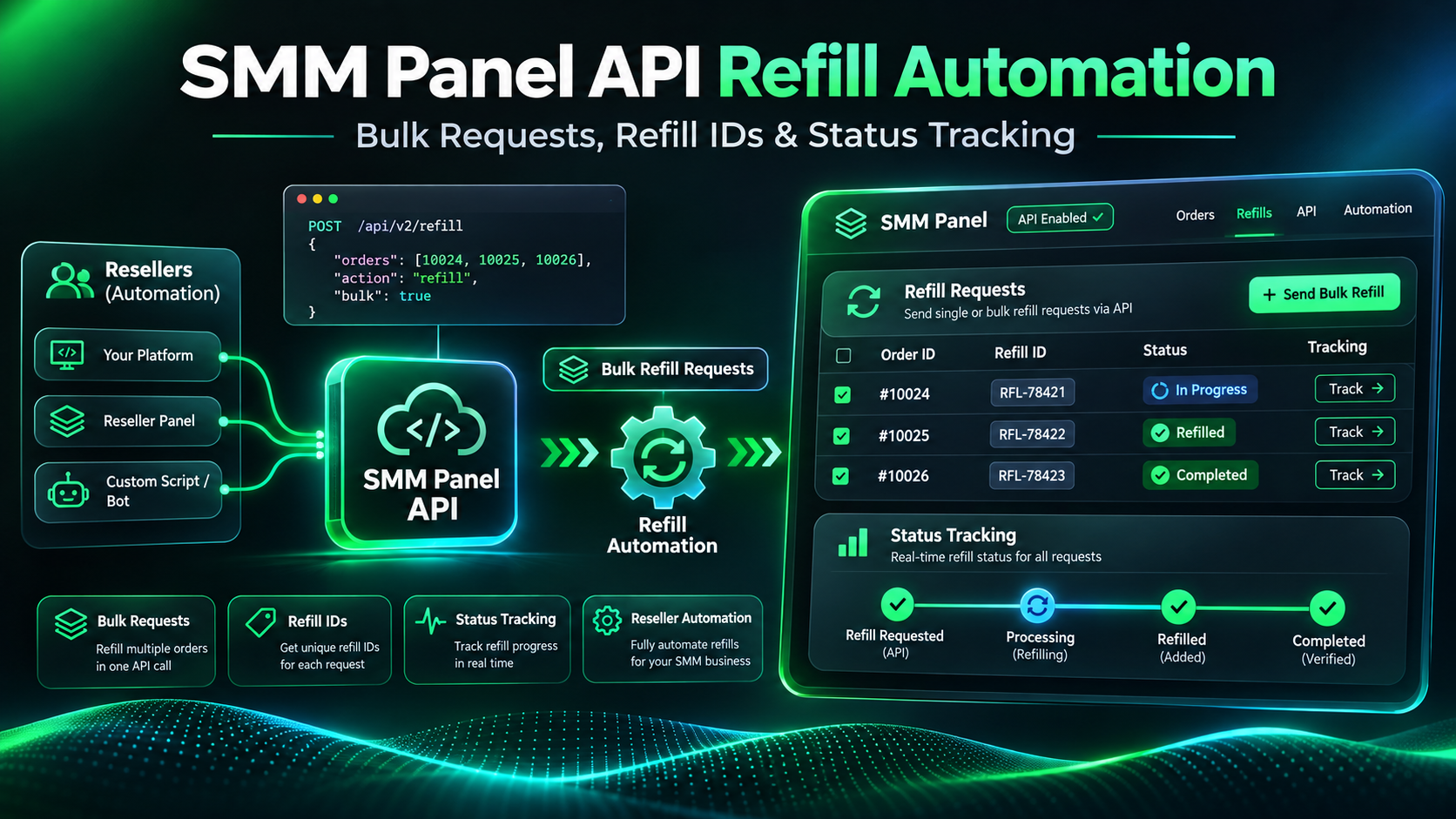
SMM Panel API Refill Automation: Bulk Requests, Refill IDs & Status Tracking
A customer contacts your reseller panel because an order that previously showed Completed has experienced a decrease in its delivered quantity.
Your support team checks the service conditions, identifies that the order may be eligible for refill, and opens the supplier dashboard to submit a request.
That workflow may be manageable for a few customers.
But what happens when your reseller business processes hundreds of orders and receives multiple refill-related inquiries every day?
Repeated manual checks create administrative work. They can also lead to duplicate requests, incorrect order references, and missed status updates.
This is where SMM panel API refill automation becomes relevant.
A compatible supplier API can allow reseller software to submit eligible refill requests, capture the resulting Refill IDs, and monitor their statuses.
However, creating a refill request is not the same as completing a refill. Each request remains subject to the supplier's service conditions and evaluation.
In this guide, we'll explain the technical workflow behind refill automation, including single-order requests, bulk refill submissions, Refill ID mapping, response validation, and safe status monitoring.
We'll use the publicly documented API of SMMECO as our implementation reference.
What Is SMM Panel API Refill Automation?
SMM panel API refill automation is the use of software to manage eligible refill requests through a supplier's documented API instead of handling every request manually.
A refill typically concerns a previously fulfilled order that may qualify for replacement of a decreased quantity under the selected service's conditions.
Refill automation is primarily about organizing that process.
It can help a reseller:
- Identify orders with documented refill support.
- Evaluate locally available eligibility information.
- Prepare a refill request for an approved supplier Order ID.
- Submit supported single or bulk refill requests.
- Store the resulting Refill IDs.
- Retrieve each refill's reported status.
- Update internal support and customer records.
The automation should not automatically promise that a refill will be accepted.
Quick Answer: SMMECO's API documents action=refill for individual and bulk refill requests, plus action=refill_status for status tracking. Bulk operations support up to 100 identifiers per request, but refill eligibility and successful processing are not guaranteed.
Why Refill Automation Matters for SMM Resellers
Resellers frequently manage customer requests across multiple service categories and suppliers.
When a customer asks for refill assistance, the support team may need to locate the correct supplier order, verify the service's conditions, and track the resulting request.
A structured integration can reduce this repetitive work.
Faster Internal Administration
A reseller dashboard can collect refill-related information in one place rather than requiring support agents to switch between several supplier pages.
Fewer Identifier Mistakes
An automated system can preserve the relationship between the reseller's internal order and the supplier's Order ID.
Clearer Request History
The application can record whether a refill was requested, when a valid response was received, and which Refill ID was assigned.
Better Status Visibility
Once a Refill ID is confirmed, the reseller can retrieve the supplier's reported refill status.
Reduced Duplicate Requests
Local request records and controlled submission states can help prevent accidental repeated refill requests.
The key benefit is operational organization, not a guarantee of improved fulfillment.
Understanding Refill Eligibility Before Using the API
The first step is knowing which orders may qualify.
Not every SMM panel service includes refill support.
Some listings are explicitly described as No Refill.
Other listings may provide refill support only within a limited period or under specific conditions.
For example, eligibility may depend on the recorded start count, target accessibility, service type, guarantee period, and restrictions on overlapping orders.
The complete service rules should be reviewed before an API request is submitted.
What Does the SMMECO Service List Show?
SMMECO's documented services API response includes a refill field.
The field may indicate whether a listing supports refill requests.
However, the presence of refill: true does not establish that every order for that service currently qualifies.
The order still needs to satisfy the applicable conditions.
Should Every Completed Order Receive an Automatic Refill?
No.
Completed is a supplier-reported order status, not a universal refill authorization.
Likewise, a customer's report of a count decrease does not independently establish how much of that decrease qualifies for replacement.
For service conditions and guarantee explanations, see our SMM Panel Refill, Cancel & Drop Policies Guide.
How the SMMECO Refill API Works
SMMECO documents a JSON-based API at:
Endpoint: https://smmeco.com/api/v2
Request method: HTTP POST
The refill functionality includes four important request formats.
Create a Single Refill
Use action=refill together with the original supplier Order ID in the order parameter.
Create Multiple Refills
Use action=refill together with comma-separated Order IDs in the orders parameter.
The documented limit is 100 Order IDs per request.
Check a Single Refill Status
Use action=refill_status together with the assigned Refill ID in the refill parameter.
Check Multiple Refill Statuses
Use action=refill_status together with comma-separated Refill IDs in the refills parameter.
The documented limit is 100 Refill IDs per request.
These operations are related, but their identifier requirements are not interchangeable.
Full reference: SMMECO API Documentation.
Example: Single Refill API Request
A single refill request uses a confirmed supplier Order ID.
The technical example displayed below this heading uses a fictional Order ID and a placeholder API key.
The request demonstrates the required API parameter names.
Submitting a real refill request may create a supplier-side request, so only eligible and authorized orders should be used.
What Does a Successful Response Contain?
SMMECO's API documentation shows a successful single refill response containing a refill identifier.
This is the reference assigned to the refill request.
The reseller should store that value alongside the original supplier Order ID.
The returned identifier does not mean the refill has already been completed.
It only confirms the refill request reference returned by the API.
Order ID vs Refill ID vs Service ID
These identifiers serve different purposes.
Service ID: Identifies a service in the supplier's catalog.
Order ID: Identifies the original supplier order.
Refill ID: Identifies the corresponding refill request.
Imagine a fictional transaction.
A reseller's customer places Local Order C-1052.
The upstream supplier accepts it as Order 12345.
Later, the supplier accepts a refill request and assigns Refill ID 501.
The reseller should retain all three references as separate fields.
Do not submit a Refill ID when the API expects an Order ID.
Do not treat the Service ID as the original purchase reference.
For a dedicated explanation of service identifiers, read our SMM Panel Service ID Guide.
How to Create Multiple Refill Requests With One API Call
SMMECO documents a bulk refill format that accepts up to 100 comma-separated supplier Order IDs.
This is useful when a reseller has several independently verified refill-eligible orders.
Instead of sending one request per order, the application can submit a supported batch.
However, the availability of bulk submission should not encourage indiscriminate requests.
Each candidate order must still be checked against its applicable service and eligibility conditions.
How Should a Reseller Build a Batch?
Start with a list of candidate supplier Order IDs.
Validate each identifier and remove duplicates from the local submission list.
Check the available service information and relevant request history.
Exclude orders with unresolved prior refill submissions until their outcomes are established.
Then divide the approved collection into batches that respect the documented limit.
For example, 230 eligible Order IDs require at least three batches:
Batch A: 100 IDs.
Batch B: 100 IDs.
Batch C: 30 IDs.
The actual request frequency must also comply with the supplier's access requirements.
Example: Bulk Refill Response
The example shown below this heading demonstrates a JSON array with multiple per-order results.
The numbers are fictional and are used only to illustrate the documented response structure.
A batch may contain both accepted refill references and errors.
For example, one order may return a Refill ID while another returns an error indicating that the Order ID was not recognized.
Why Must Results Be Processed Individually?
A successful HTTP response does not guarantee that every item in the batch was accepted.
The reseller should inspect the result for each supplier Order ID.
Accepted Refill IDs should be stored with their corresponding orders.
Errors should be recorded for investigation.
An invalid Order ID error does not automatically mean the original customer purchase was canceled or refunded.
Understanding Refill Status Responses
After a Refill ID has been accepted and stored, the reseller can query its current status.
SMMECO's documentation includes examples such as:
Completed
The supplier reports that the refill request has reached a completed state.
Rejected
The supplier reports that the refill request was rejected.
Refill not found
The lookup did not locate the requested refill record.
These values should not be confused with the status of the original order.
For example, the original order may remain Completed while a separate refill request is Rejected.
Does Completed Guarantee Permanent Results?
No.
A supplier-reported Completed refill status does not guarantee that the underlying social platform will permanently retain every displayed interaction.
Platform counts and service conditions can change independently.
What Should Happen After Rejection?
The reseller should preserve the Refill ID, record the supplier's response, and investigate the conditions that apply.
A rejected request should not automatically trigger another submission.
Repeating the same request without resolving the reason may create unnecessary API traffic or additional support work.
PHP Example: Check a Refill Status
The PHP example displayed below this heading shows how to perform a read-only refill-status lookup.
It uses a private API key supplied through the server environment.
The request sends:
action: refill_status
refill: A confirmed Refill ID.
The code validates the HTTP result and checks that the JSON response contains an expected status field.
This is deliberately a read-only example.
It does not submit a new refill, cancel an order, or modify a customer balance.
Why Keep Status Monitoring Separate From Submission?
Submitting a refill request and retrieving its status have different purposes.
A monitoring process should only use the supplier's status operation.
A temporary failure while checking a Refill ID must not cause the original refill request to be submitted again.
For more technical troubleshooting, see our SMM Panel API Errors Guide.
Example: Split Eligible Orders Into Batches
The PHP example displayed below this heading demonstrates dividing an approved collection of Order IDs into groups of 100.
It does not perform an actual API submission.
This distinction is intentional.
Before making real refill requests, a reseller must implement its eligibility controls, submission history, and error-handling procedures.
Batching is a technical optimization, not an eligibility check.
How to Prevent Duplicate Refill Requests
Duplicate prevention matters because an API timeout may occur after a supplier has already accepted a request.
Consider this hypothetical situation.
A reseller submits a refill request.
The supplier creates a Refill ID.
Before the response reaches the reseller's server, the connection closes.
The reseller sees a timeout but does not know whether the request was accepted.
Automatically sending the same request again could create another request for the same original order.
Safer Submission States
A reseller can define internal states such as:
Eligible for Review: The order appears to meet preliminary conditions.
Approved to Submit: The request has passed the reseller's validation process.
Submitting: A worker is performing the supplier request.
Submitted: A confirmed Refill ID was received.
Needs Reconciliation: The result is uncertain and requires investigation.
Rejected: The supplier returned a confirmed rejection for that request.
These are suggested reseller-side states, not official SMMECO API statuses.
How Should Timeouts Be Handled?
Preserve the local submission record.
Do not immediately send another refill request.
Check stored responses, supplier records, or available support information before deciding what happened.
If the provider has already accepted the request, attach the corresponding Refill ID to the original local record.
For a broader explanation of safe automation principles, see the SMM Panel API Integration Guide.
How to Store Refill Records in a Reseller Database
An effective system needs a relationship between the original customer purchase and its refill history.
Useful fields include:
Local Customer Order ID
The identifier assigned by the reseller website.
Supplier Identifier
The specific upstream provider that accepted the original order.
Supplier Order ID
The order reference issued by that provider.
Refill ID
The reference returned after the refill request is accepted.
Submission State
The reseller's internal state for the request.
Supplier Refill Status
The most recently confirmed status from the API.
Last Checked At
The timestamp of the last successful status lookup.
Why Include Supplier Identity?
An identical numerical Order ID may exist at two unrelated SMM providers.
A refill request must be sent to the provider that accepted the original order.
Without this mapping, a multi-provider reseller could accidentally submit a refill request to the wrong supplier.
How Often Should You Check Refill Statuses?
There is no universally correct polling interval.
A reseller should consider its request volume, operational needs, and the supplier's permitted API usage.
For example, active refill requests may require periodic review, while completed or rejected requests may need less frequent checks.
However, these are internal scheduling choices.
SMMECO's public API reference documents the supported refill-status operations but does not establish a universal mandatory polling interval.
Avoid excessive requests and preserve the last verified status when a lookup fails.
How Refill Automation Helps Customer Support
A centralized refill-management interface can help support agents answer practical questions.
For example:
Has a refill request been submitted?
The reseller can check whether a confirmed Refill ID was stored.
Which supplier is responsible?
The system can identify the provider associated with the original order.
What is the latest reported status?
The software can retrieve the latest valid refill-status response.
Was the request rejected?
The reseller can inspect the stored status and investigate the applicable service conditions.
This improves administrative visibility without promising a particular refill outcome.
Customers should receive accurate information about eligibility and supplier responses.
What Makes an API Supplier Useful for Refill Management?
When evaluating a potential SMM API supplier, resellers should look beyond advertised prices.
Relevant questions include:
- Does the supplier publish refill-related API operations?
- Can its service catalog indicate refill capability?
- Can individual and bulk refill requests be submitted?
- Does the API return trackable Refill IDs?
- Can refill statuses be checked programmatically?
- Are eligibility conditions explained?
- Can failed requests be investigated through official support?
SMMECO documents these core API request formats.
That makes it a relevant option for resellers assessing the technical capabilities of an upstream provider.
However, the API does not establish guaranteed approval, delivery time, or permanent retention for every refill request.
Frequently Asked Questions About SMM Panel API Refill Automation
What is SMM panel API refill automation?
It is the use of a supplier API to manage eligible refill requests and track their statuses through a reseller's software.
Does SMMECO support refill requests through API?
Yes. The official API documentation includes single-order and multiple-order refill request formats.
Can I submit 100 refill requests in one API call?
SMMECO documents a bulk refill request format accepting up to 100 comma-separated supplier Order IDs.
Which parameter creates a single refill?
Use action=refill with the order parameter containing the original supplier Order ID.
Which parameter creates multiple refills?
Use action=refill with the orders parameter containing supported comma-separated Order IDs.
What is a Refill ID?
A Refill ID identifies a particular refill request accepted by the supplier's system.
How do I check refill status?
Use the documented refill_status action with the relevant confirmed Refill ID.
Can I check several Refill IDs together?
Yes. SMMECO documents a refills parameter for up to 100 Refill IDs in a multiple-status request.
Does refill: true guarantee approval?
No. Service capability and order eligibility are separate questions.
What does Refill not found mean?
The supplier's status lookup did not locate the requested refill record. It does not automatically establish a refund or cancellation.
Should I retry a refill request after a timeout?
Not automatically. Investigate whether the original request was accepted before submitting another request.
Can I use PHP for refill status monitoring?
Yes. PHP can call the documented API from a trusted server and process the returned JSON response.
Is a refill the same as a refund?
No. Refill eligibility and financial refund conditions are separate matters.
Final Thoughts: Make Refill Management More Organized
A reliable SMM panel API refill automation workflow should begin with service eligibility and accurate order mapping.
The API can help submit supported requests and retrieve refill-status information, but it cannot replace the supplier's eligibility conditions.
For reseller businesses, the most important controls include preserving original supplier Order IDs, storing accepted Refill IDs, preventing unintended duplicate requests, and handling API errors accurately.
SMMECO provides documented refill operations that compatible reseller systems can evaluate as part of their supplier selection.
If you manage an SMM reseller website and need a supplier with documented API functionality, review SMMECO and its official API reference.
Key Takeaway: Refill automation is most valuable when it improves order management, avoids duplicate submissions, and keeps customer records aligned with confirmed supplier responses.