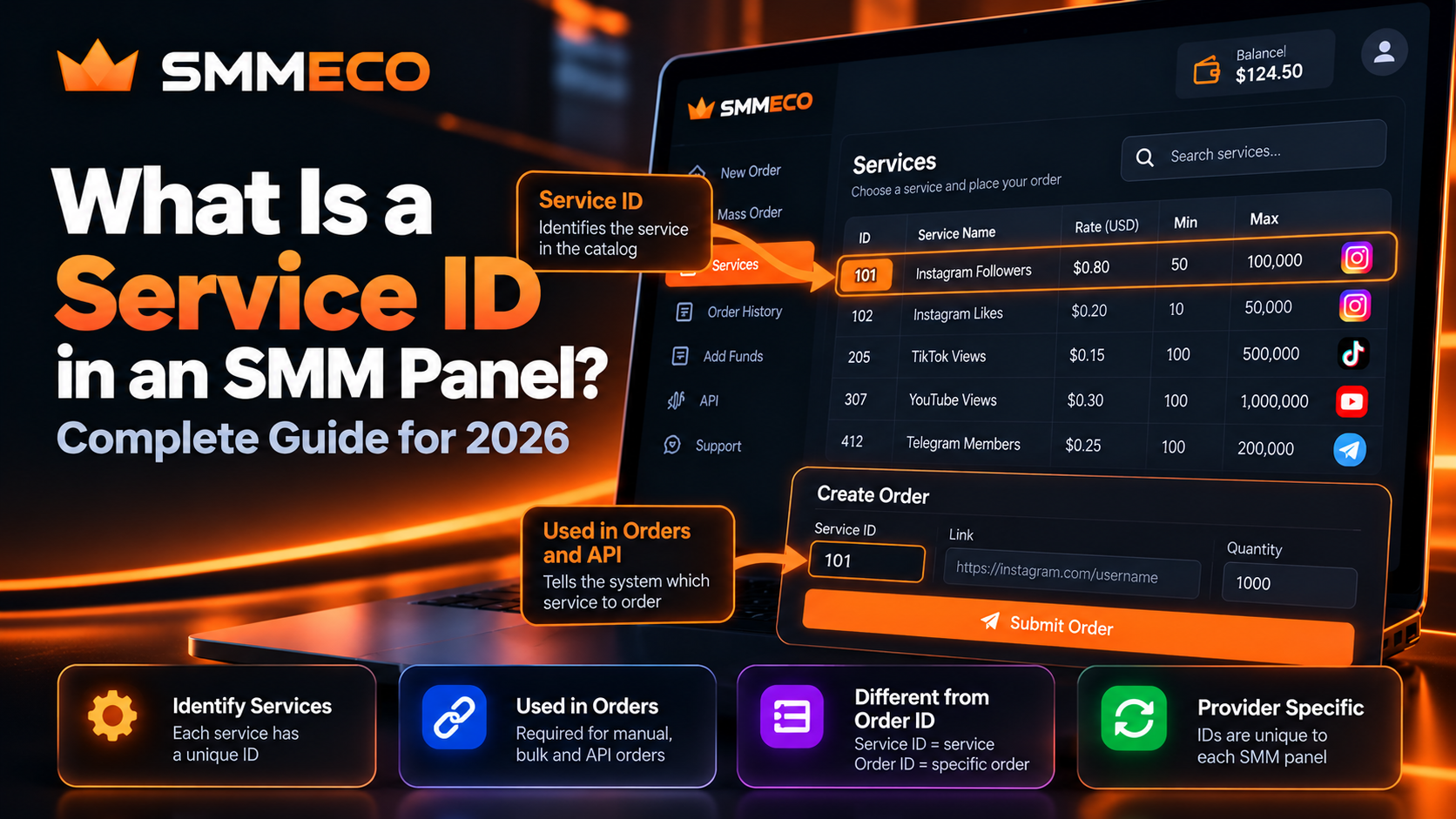
What Is a Service ID in an SMM Panel? Complete Guide for 2026
If you've ever browsed an SMM panel's service catalog, you've probably noticed a number displayed beside each service. One listing might have the number 105, while another uses 320 or 1502.
These numbers are called Service IDs.
They may seem like minor details, but they play an important role in identifying services, preparing orders, connecting SMM panel APIs, and managing reseller operations.
One common mistake is confusing a Service ID with an Order ID. Another is assuming the same Service ID represents the same service across different providers.
Both misunderstandings can cause ordering errors.
In this guide, we'll explain what an SMM panel service ID means, how to find it, how it works, and why it matters for customers and resellers.
We'll also examine how Service IDs are represented in the documented API of SMMECO, a global SMM panel offering multiple social media service categories.
What Is a Service ID in an SMM Panel?
A Service ID in an SMM panel is a unique identifier assigned to a particular service within that provider's service catalog.
It allows the system to identify which service a customer wants to order.
For example, an SMM panel might display the following hypothetical listings:
- Service ID 101 — Instagram Post Likes
- Service ID 205 — TikTok Video Views
- Service ID 307 — YouTube Video Views
- Service ID 412 — Telegram Channel Views
These IDs are fictional examples, not actual SMMECO service numbers.
Each identifier connects to a particular service listing and its associated conditions.
When a customer selects Service ID 205, the panel can identify the corresponding service and retrieve details such as price, quantity limits, and supported ordering options.
Quick Answer: An SMM panel Service ID identifies a service available for ordering. It is different from an Order ID, which identifies a specific order after submission.
Why Do SMM Panels Use Service IDs?
An SMM panel may offer hundreds or thousands of service listings.
Some of these services can have similar names.
For example, a catalog may contain several listings associated with Instagram video views, each with different quantity limits or conditions.
Relying only on a service name could create confusion.
Service IDs provide a practical way to distinguish individual listings.
1. Identifying the Correct Service
The Service ID helps the ordering system identify the exact listing selected by the customer.
Even when two service descriptions look similar, they may have different IDs and different requirements.
2. Organizing Large Service Catalogs
SMM panels commonly organize services by platform and category.
An ID allows the platform to reference a specific listing independently of its displayed name.
3. Supporting Automated Orders
For API-based order submission, the Service ID is often a required parameter.
It tells the supplier which service the external application is requesting.
4. Helping Resellers Manage Suppliers
Resellers may need to associate services from an upstream supplier with products in their own catalog.
Service IDs are essential to that mapping.
However, a Service ID is only meaningful within its provider's catalog. It is not a universal identifier shared by every SMM panel.
Service ID vs Order ID: What Is the Difference?
This is one of the most important distinctions to understand.
A Service ID identifies the service being purchased, while an Order ID identifies a particular submitted order.
Consider this hypothetical example.
A customer selects a service with ID 307 and places an order for 1,000 units.
After the order is accepted, the panel assigns Order ID 85021.
The customer later orders the same service for a different target.
The second order receives Order ID 85022.
Both orders may use the same Service ID, but each has its own Order ID.
Example Breakdown
Service ID: 307
Identifies the selected service within the catalog.
Order ID: 85021
Identifies the first submitted order.
Order ID: 85022
Identifies the second submitted order.
The numbers in this example are illustrative.
When Should You Use Each ID?
Use the Service ID when:
- Selecting a particular service.
- Preparing an eligible mass order.
- Mapping supplier services in a reseller system.
- Creating an order through a supported API.
- Verifying which service is associated with a catalog listing.
Use the Order ID when:
- Checking the status of an existing order.
- Contacting support about a submitted request.
- Reviewing a partial or canceled order.
- Requesting an eligible refill.
- Reconciling an order's charge or completion record.
Confusing these identifiers can lead to incorrect requests or failed API operations.
How to Find a Service ID in an SMM Panel
The exact location of a Service ID depends on the provider's interface.
Many SMM panels display the identifier directly in their service catalog.
Others show it beside the service name or inside the order form.
Step 1: Sign In to Your SMM Panel
Open your provider's website and access your account.
For example, users researching SMMECO can begin at the official SMMECO website.
Step 2: Open the Service Catalog
Locate the available service categories.
These may include services associated with Instagram, TikTok, YouTube, Telegram, and other supported platforms.
Step 3: Find the Required Service
Read the service description carefully.
Do not select a listing simply because its name appears similar to another service.
Check the platform, target requirements, and relevant conditions.
Step 4: Identify the Service Number
Look for the numeric identifier associated with the listing.
Depending on the interface, it may appear as:
ID: 307Service #307307 - Example Service Name
The exact presentation varies by provider.
Step 5: Verify the Service Details
Before placing an order, confirm the selected service's current information.
Important details can include minimum quantity, maximum quantity, supported links, price, and applicable refill or cancellation conditions.
Step 6: Keep the Identifier With Your Records
If you regularly use the service, recording its ID may help with internal administration.
However, verify that the service remains available before using an old identifier again.
Are Service IDs the Same on Every SMM Panel?
No. SMM panel Service IDs are generally provider-specific.
This means Service ID 250 on one SMM panel may identify a completely different service on another.
For example:
Provider A
Service ID 250 — Hypothetical Instagram Likes Service
Provider B
Service ID 250 — Hypothetical YouTube Views Service
The numbers match, but the associated services do not.
There is no universal industry-wide Service ID directory that guarantees the same numbering across unrelated providers.
For this reason, a reseller connecting multiple suppliers should never assume that matching IDs identify equivalent products.
Each supplier catalog must be interpreted separately.
Can an SMM Panel Service ID Change?
Yes. Service identifiers and service availability may change as a provider updates its catalog.
An SMM panel may add new services, discontinue existing listings, or modify service configurations.
Whether an existing ID remains unchanged depends on the provider's management system.
What Happens if You Use an Old Service ID?
Several outcomes are possible.
The service may still be available and work normally.
It may no longer exist.
Or the identifier may no longer correspond to the listing you previously recorded.
A reseller should never assume that a saved Service ID will remain valid indefinitely.
How to Avoid Outdated Service IDs
Before submitting orders, compare the identifier with the current supplier catalog.
For automated integrations, periodically refresh service information and review unexpected changes.
Do not silently replace an unavailable service with another simply because its name looks similar.
How Service IDs Work in the SMMECO API
SMMECO publishes an official API documentation page describing its available integration operations.
The documentation identifies the API endpoint as:
https://smmeco.com/api/v2
It specifies HTTP POST requests and JSON responses.
Two documented actions are particularly relevant to Service IDs.
1. Retrieving the Service List
The documented service-list operation uses:
action=services
The request also requires the account's private API key.
The service list can return information including:
service— Service IDname— Service nametype— Service typecategory— Service categoryrate— Listed service ratemin— Minimum order quantitymax— Maximum order quantityrefill— Advertised refill availabilitycancel— Advertised cancellation availability
These fields allow a compatible application to identify services and examine their published specifications.
Example of a Service List Response
SMMECO's documentation includes a sample service represented with the following information:
- Service ID:
1 - Name:
Followers - Type:
Default - Rate:
0.90 - Minimum:
50 - Maximum:
10000 - Refill:
true - Cancel:
true
This is a documentation example, not confirmation that the service is currently available at that price.
The important field for our discussion is service.
Its value identifies the listed service within the supplier's catalog.
2. Submitting an Order
SMMECO's documented order-creation operation uses:
action=add
For a standard quantity-based order, the documented parameters include:
key— Private API keyaction— The requested operationservice— Service IDlink— Target linkquantity— Requested quantity
Some service types require additional or different parameters.
When the provider accepts a request, the documented example response includes an order value.
That returned value is the Order ID for the submitted request, not a new Service ID.
Technical takeaway: In SMMECO's API, service identifies what is being ordered, while order identifies the resulting order record.
For a broader technical explanation, read our SMM Panel API Integration Guide for Resellers.
What Is an Invalid Service ID Error?
An invalid Service ID error generally means the panel or API cannot accept the specified service identifier for the requested operation.
This may occur for several reasons.
The ID Does Not Exist
The submitted number may not match any available listing in the current catalog.
Check the service list and verify the number.
The Service Is No Longer Available
A previously available service may have been removed or disabled.
Refresh the service catalog rather than relying on an old saved list.
The Wrong Provider ID Was Used
A reseller working with several suppliers may accidentally send Provider A's Service ID to Provider B.
Even if the numeric identifier is valid at Provider B, it could refer to a different service.
Incorrect Request Parameters
Sometimes an error arises because the request is malformed or the selected service requires different information.
Do not assume every failed order is caused solely by the Service ID.
Check the full response and the supplier's documentation.
How to Fix an Invalid Service ID
A practical troubleshooting sequence is:
- Retrieve or open the provider's current service catalog.
- Confirm the exact Service ID.
- Verify that the service is available for the account.
- Review the target link and quantity requirements.
- Check whether additional parameters are required.
- Retry only after verifying the previous request's outcome.
For paid API requests, avoid automatically submitting duplicates after a timeout or unclear response.
How Service IDs Work in Mass Orders
Mass Order functionality allows users to prepare several individual service requests within one submission workflow.
Many SMM panels use Service IDs to determine which service should be applied to each request.
For example, an illustrative bulk order might contain:
- Service ID: 101 — Target A — Quantity 500
- Service ID: 101 — Target B — Quantity 1,000
- Service ID: 205 — Target C — Quantity 2,000
The Service IDs and targets are fictional examples.
The first two requests use the same service, while the third uses a different service.
Even when several requests share the same Service ID, they can receive separate Order IDs after successful submission.
Why Service ID Accuracy Matters in Mass Orders
When several requests are submitted together, an incorrect Service ID can affect more than one request.
Before submitting a batch, verify that every selected service matches its intended target and requirements.
The exact accepted syntax, separator characters, and additional fields depend on the provider.
SMMECO advertises Mass Order functionality, but customers should confirm the current submission format inside their account.
Service IDs for SMM Resellers: Why Mapping Matters
Service ID management becomes especially important when a reseller operates its own panel and purchases services from another provider.
Imagine a reseller using two different suppliers.
The reseller's own website displays a product called Example Social Media Service.
Internally, it may assign that product Local Service ID 450.
The upstream supplier might identify its corresponding service using ID 1205.
These identifiers are different because they belong to separate systems.
Example of Service Mapping
- Reseller's local Service ID:
450 - Upstream supplier:
Provider A - Supplier Service ID:
1205 - Reseller product:
Example Social Media Service
All values are hypothetical.
When a customer selects the local product, the reseller system must identify the correct upstream supplier and corresponding Service ID before submitting an order.
Why a Provider Name Must Be Stored With the ID
Suppose a reseller also integrates Provider B.
Provider B might have its own Service ID 1205, representing an unrelated product.
If the reseller stores only the numeric identifier without the provider reference, the system could select the wrong listing.
For this reason, a safer internal mapping uses the combination of supplier identity and Service ID.
What Happens When a Supplier Changes Its Catalog?
The reseller must review the mapping.
If the upstream service disappears or its conditions change, the reseller's customer-facing listing may need updating.
A robust system should detect unexpected changes rather than assuming that an imported service will remain identical forever.
For more information about supplier selection and reseller operations, see our How to Choose an SMM Panel Provider for Resellers guide.
Can You Identify Service Quality From a Service ID?
No.
A Service ID is an identifier, not an independent quality rating.
A smaller number does not necessarily mean that a service is older, better, cheaper, or more reliable.
Likewise, a larger Service ID does not prove that the service was added recently.
The way identifiers are assigned depends on the provider's internal system.
What Should You Check Instead?
Evaluate the information associated with the service, including:
- Current service description
- Supported target format
- Quantity restrictions
- Price and applicable charges
- Refill or cancellation eligibility
- Published operating conditions
- Platform compliance risks
These details are more meaningful than the number itself.
A Service ID can help you locate the correct listing, but it does not tell you whether the service is appropriate for your needs.
Service ID, Category ID, Provider ID and Order ID
SMM panel systems may use several kinds of identifiers.
Their meanings should not be confused.
Service ID: Identifies a specific service listing.
Category ID: Where used, identifies a group of related services.
Provider ID: Where used, identifies an upstream supplier in the system.
Order ID: Identifies an individual submitted order.
Refill ID: Where supported, identifies a specific refill request.
Not every panel exposes all these identifiers to customers.
For instance, SMMECO's public API documentation shows a refill identifier returned after a refill request, while standard order submission returns an order identifier.
Understanding which ID is required for each action prevents avoidable integration and support errors.
Common Mistakes When Using SMM Panel Service IDs
1. Confusing a Service ID With an Order ID
A service identifier selects the listing. An order identifier refers to a transaction record.
Use the ID requested by the specific operation.
2. Assuming Service IDs Are Universal
Different providers maintain separate service catalogs.
Never transfer IDs between suppliers without verifying their meanings.
3. Reusing Outdated Service Lists
Service availability and identifiers can change.
Refresh catalog information regularly.
4. Selecting Services Only by Name
Two services with similar names may have different conditions or supported target types.
Read the full specifications.
5. Ignoring Minimum and Maximum Quantities
A valid Service ID does not guarantee that every requested quantity is acceptable.
Check the service limits.
6. Using the Wrong Supplier Mapping
Multi-provider integrations should store the supplier identity and its Service ID together.
Do not rely on the number alone.
7. Automatically Retrying Uncertain Paid Orders
A request that times out may still have been accepted.
Verify the order record before submitting it again.
8. Sharing Private API Credentials
Service IDs are catalog references, but API keys are authentication credentials.
Never expose private API keys in public code, customer messages, or screenshots.
How to Manage Service IDs Efficiently
If you operate an SMM reseller business, keeping an organized service catalog can make routine administration easier.
A simple record might include the following:
- Supplier name
- Supplier Service ID
- Internal Service ID
- Service description
- Service type
- Price
- Minimum quantity
- Maximum quantity
- Refill and cancellation conditions
- Last verified date
For integrations with multiple providers, maintaining these records consistently helps prevent incorrect service selection.
Keep a Change History
When a service changes, record what was updated and when.
For example, if a supplier removes a service or modifies its quantity limits, the reseller should know which customer-facing listing is affected.
Validate Before Ordering
Before sending a request, verify the supplier, Service ID, target type, quantity, and available account balance.
Separate Service Data From Order Data
Service catalog information describes what can be ordered.
Order information describes what was submitted and what happened afterward.
Keeping the two types of records separate simplifies troubleshooting and reporting.
Frequently Asked Questions About SMM Panel Service IDs
What is a Service ID in an SMM panel?
A Service ID is a unique identifier assigned to a particular service within an SMM panel's catalog. It helps the system identify which service a customer or application wants to order.
Where can I find the Service ID?
Service IDs are commonly displayed in the service catalog, beside service names, or in the ordering interface. The exact location depends on the provider.
Is Service ID the same as Order ID?
No. A Service ID identifies the selected service. An Order ID identifies a specific order created using that service.
Can two orders have the same Service ID?
Yes. Multiple orders can use the same Service ID if they request the same available service. Each accepted order normally receives its own Order ID.
Can two SMM panels use the same Service ID?
Yes, but the identical number does not mean they offer the same service. Service IDs are provider-specific.
Why is my Service ID not working?
The ID may be incorrect, outdated, unavailable, or associated with the wrong supplier. Check the current service catalog and the request's other required parameters.
Can Service IDs change after a panel updates its services?
Yes. Service identifiers and availability may change when a provider modifies its catalog. Resellers should verify current mappings before submitting automated orders.
What is a Service ID in an SMM panel API?
In common SMM API implementations, the Service ID is a parameter used to identify the service requested during order submission. SMMECO uses the service parameter for this purpose.
Do I need a Service ID for Mass Order?
Many mass order interfaces use Service IDs to identify services within each request. The exact input format depends on the provider and ordering system.
Does a lower Service ID mean better quality?
No. The identifier itself does not prove service quality, pricing, age, delivery speed, or reliability.
Does SMMECO provide Service IDs through its API?
Yes. SMMECO's documented service-list operation includes a service field that identifies each service in the returned catalog information.
Final Thoughts: Understanding Service IDs in SMM Panels
An SMM panel Service ID may look like a simple number, but it plays an important role in service selection, order management, and reseller integrations.
The most important thing to remember is that a Service ID identifies a service, while an Order ID identifies a specific submitted order.
Service IDs are generally unique within a provider's catalog, not across the entire SMM industry.
For customers, understanding this distinction can help prevent ordering mistakes.
For resellers, managing accurate Service ID mappings is especially important when connecting multiple suppliers or maintaining automated order workflows.
SMMECO documents Service ID usage through its API service-list and order-submission operations.
To explore its available service categories and technical documentation, visit SMMECO or review the official SMMECO API documentation.
Key takeaway: A Service ID tells an SMM panel which service you selected. Always verify it against the current provider catalog before placing an order.